Spot Fleet Auto Scaling: Best Practices 2026

Spot Fleet Auto Scaling combines Amazon EC2 Spot Instances with automated capacity management to reduce cloud costs while maintaining application performance. By leveraging spare AWS capacity, Spot Instances can cut costs by up to 90% compared to On-Demand pricing. However, AWS can reclaim these instances with a 2-minute notice, making a well-configured scaling strategy essential.
Key Takeaways:
- Scaling Methods: Supports Target Tracking, Step Scaling, and Scheduled Scaling.
- Instance Diversity: Use at least 10 instance types across all Availability Zones for better availability and cost efficiency.
- Allocation Strategy: The price-capacity-optimized approach balances cost and reliability.
- Interruption Handling: Use Capacity Rebalancing and lifecycle hooks to manage Spot interruptions effectively.
- Monitoring: Enable 1-minute detailed monitoring.
AWS recommends transitioning to EC2 Auto Scaling groups for advanced features, as Spot Fleet is now considered a legacy service. By following these practices, you can optimize costs without sacrificing performance.
Leveraging Amazon EC2 Spot Best Practices Using the New Capacity Optimized Allocation Strategy
Requirements and Core Components
Before diving into Spot Fleet Auto Scaling, it's essential to grasp the core components involved. A solid understanding of these basics will help you avoid potential issues down the road.
Spot Fleet Request Types
Spot Fleet offers two types of request configurations, but only the maintain type is compatible with auto scaling. Here's how they differ:
- A maintain request automatically replaces interrupted Spot Instances, ensuring your fleet consistently meets its target capacity. This makes it ideal for Auto Scaling scenarios.
- A request type, on the other hand, is a one-time request. If instances are interrupted, the fleet won't replace them or submit new requests, which means it doesn’t support Auto Scaling.
| Feature | maintain Request Type |
request Request Type |
|---|---|---|
| Auto Scaling Support | Supported (Target Tracking, Step, Scheduled) | Not Supported |
| Interruption Handling | Automatically replenishes interrupted instances | No replenishment |
| Purpose | Maintain steady target capacity over time | One-time request |
When setting up your Spot Fleet through the AWS Management Console, make sure to select the "Maintain target capacity" option to enable automatic scaling.
IAM Permissions and Monitoring Setup
To enable Spot Fleet Auto Scaling, specific IAM permissions are required. The process involves a service-linked role called AWSServiceRoleForApplicationAutoScaling_EC2SpotFleetRequest. This role is essential because it allows Application Auto Scaling to perform tasks like describing alarms, monitoring fleet capacity, and adjusting capacity on your behalf. Fortunately, this role is automatically created when using the AWS console.
Additionally, your user account must have permissions across multiple AWS services:
- Application Auto Scaling: To manage scaling policies.
- Amazon EC2: For describing and modifying Spot Fleet requests.
- CloudWatch: To create and manage alarms and access metrics.
Enabling detailed monitoring is another critical step. While standard monitoring provides data every 5 minutes, detailed monitoring updates metrics every minute—a level of granularity where native tools like AWS Cost Explorer often fall short in real-time management. This faster data feedback ensures your fleet can react quickly to changes in utilization.
Before implementing scaling policies via the CLI or SDK, you’ll need to register your Spot Fleet as a scalable target using the register-scalable-target command. This step defines key parameters like the resource ID, scalable dimension (e.g., ec2:spot-fleet-request:TargetCapacity), and the namespace that Application Auto Scaling will use to manage your fleet.
Up next, we’ll delve into strategies for fine-tuning your scaling policy implementation.
Best Practices for Spot Fleet Auto Scaling
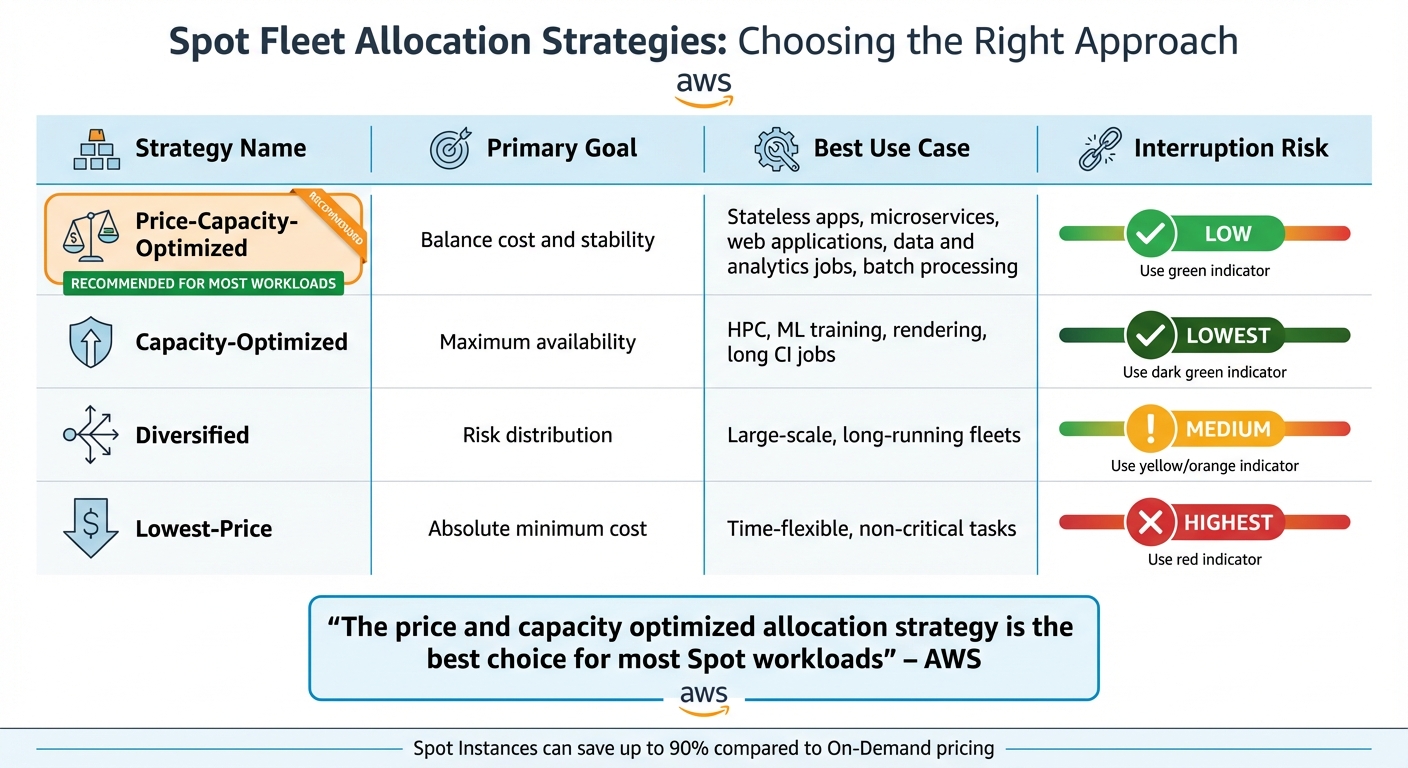
Spot Fleet Allocation Strategies Comparison: Cost vs Reliability
Implement strategies that balance cost efficiency with workload reliability.
Use Multiple Instance Types and Availability Zones
Flexibility is the backbone of resilient Spot Fleets. Each combination of instance type and Availability Zone represents a unique Spot capacity pool. The more pools you have, the better your chances of securing the capacity you need.
"Be flexible across at least 10 instance types for each workload." - Amazon Web Services
This approach significantly improves your odds of finding available capacity. When choosing instance types, think about both vertical and horizontal scaling. If your app can scale vertically, include larger instances with more vCPUs and memory. For horizontal scaling, older, less in-demand instance types might be a good fit. Using attribute-based instance selection can simplify this process - just specify requirements like vCPUs, memory, or storage, and AWS will automatically include matching options, even newly released ones.
Enabling all Availability Zones in your Region through your VPC configuration further expands your capacity pools. To improve your chances of success, use Spot placement scores (on a scale of 1 to 10) to identify Regions or Zones that are more likely to fulfill your capacity requests.
Once you’ve diversified your capacity pools, the next step is managing potential instance interruptions effectively.
Manage Spot Interruptions
Spot Instances are cost-effective, but they can be interrupted. To handle this, take advantage of EC2 Instance Rebalance Recommendations, which provide early warnings about possible interruptions. Enabling Capacity Rebalancing ensures that a replacement Spot Instance is launched as soon as a rebalance recommendation is received, even if it temporarily increases your capacity by up to 10%.
Lifecycle hooks can pause instance terminations, giving you time for tasks like draining queues or saving logs. Similarly, checkpointing allows applications to resume without starting from scratch. However, avoid switching to On-Demand instances during Spot interruptions, as this can lead to additional interruptions across your fleet.
After addressing interruptions, focus on choosing the right allocation strategy to balance costs and performance.
Choose the Right Allocation Strategy
The allocation strategy you choose determines how Spot capacity pools are used, directly affecting both cost and reliability. Capacity-aware strategies are generally more effective than the older "lowest-price" option. For most stateless workloads, the price-capacity-optimized strategy is ideal. This strategy identifies pools with high availability and selects the lowest-priced options among them.
"The price and capacity optimized allocation strategy is the best choice for most Spot workloads, such as stateless containerized applications, microservices, web applications, data and analytics jobs, and batch processing." - Amazon Web Services
| Strategy | Primary Goal | Best Use Case | Interruption Risk |
|---|---|---|---|
| Price-Capacity-Optimized | Balance cost and stability | Stateless apps, microservices, batch jobs | Low |
| Capacity-Optimized | Maximum availability | HPC, ML training, rendering, long CI jobs | Lowest |
| Diversified | Risk distribution | Large-scale, long-running fleets | Medium |
| Lowest-Price | Absolute minimum cost | Time-flexible, non-critical tasks | Highest |
If you're using instance weighting - where weights are assigned based on factors like vCPUs - allocation strategies will calculate the best price or capacity per unit of weight. This ensures a fair comparison across different instance types. Spot Instances can save you up to 90% compared to On-Demand pricing, making it crucial to select the strategy that best aligns with your workload’s needs.
Scaling Policy Types Compared
Once you've outlined a cost-efficient allocation strategy, the next step is determining how your Spot Fleet adjusts to changing demands. AWS provides three primary scaling policy types, each suited for specific workload patterns.
Target Tracking vs. Step Scaling vs. Scheduled Scaling
Target tracking functions much like a thermostat. You set a desired metric value - say, 50% CPU utilization - and AWS automatically adjusts capacity to maintain it. The system creates and manages CloudWatch alarms for you, scaling out quickly when demand rises and scaling in more gradually to ensure availability.
"With target tracking, your Auto Scaling group scales in direct proportion to the actual load on your application." - Amazon EC2 Auto Scaling
Step scaling offers more granular control by letting you define specific scaling actions based on how far a metric deviates from its threshold. For example, you could add one instance when CPU usage hits 60%, but add three instances if it spikes to 90%. While this policy allows for aggressive scaling, it requires manual configuration of alarms and step settings, making it more complex.
Scheduled scaling is all about predictability. It adjusts capacity at predetermined times and dates, making it ideal for workloads with predictable demand patterns. Unlike the reactive nature of other policies, scheduled scaling ensures resources are ready before the load arrives.
| Feature | Target Tracking | Step Scaling | Scheduled Scaling |
|---|---|---|---|
| Response Speed | Fast (Proportional to load) | Fast (Based on breach size) | Instant (Preemptive) |
| Primary Use Case | General dynamic workloads | Specific thresholds or spikes | Predictable demand patterns |
| Setup Complexity | Low (AWS manages alarms) | High (Manual configuration) | Low (Time-based setup) |
| Metric Requirement | Utilization or Throughput | Any CloudWatch metric | None (Time-based) |
| Scaling In | Gradual (Ensures availability) | Defined by step actions | Based on schedule |
For most scenarios, target tracking is the go-to option due to its simplicity and reliability. Step scaling is better suited for applications requiring fine-tuned responses to traffic spikes, while scheduled scaling shines when demand patterns are consistent and predictable. You can even combine these policies - use target tracking for everyday fluctuations and scheduled scaling to prepare for special events like a major product launch.
With these policies in place, the next step is to monitor their effectiveness and refine your approach for optimal performance. You can also estimate your savings to see how these scaling optimizations impact your overall cloud budget.
Monitoring and Performance Optimization
Keeping a close eye on your Spot Fleet Auto Scaling setup is key to fine-tuning its performance. By tracking the right metrics, you can pinpoint areas where your fleet excels and identify opportunities for improvement.
Key Metrics to Monitor
Start by tapping into the AWS/EC2Spot CloudWatch namespace. For more precise insights, switch from the default 5-minute monitoring to 1-minute detailed monitoring. This faster data refresh helps your scaling policies react to demand in real-time, rather than relying on outdated information.
Amazon EventBridge adds an extra layer of visibility by capturing fleet events as they happen. It tracks instance terminations, changes in fleet state, and - most critically - rebalance recommendation signals. These signals arrive earlier than the standard two-minute interruption notice, giving you a heads-up when an instance is at higher risk.
When managing diverse fleets, automated tools become essential for simplifying monitoring and improving performance.
Using Automated Optimization Tools
While manual monitoring might work for smaller setups, managing larger fleets requires automation. Automated tools continuously adjust your configurations based on real-time conditions, taking the complexity out of the process.
These tools monitor rebalance recommendations and proactively replace at-risk instances before they’re interrupted. They also use lifecycle hooks to handle tasks like draining queues or uploading logs during the two-minute interruption window. Advanced platforms even manage attribute-based instance type selection, automatically integrating new EC2 instance types as AWS introduces them, ensuring you have more capacity options.
Conclusion
Spot Fleet Auto Scaling can slash costs by up to 90% compared to On-Demand pricing. And the best part? You can achieve these savings without compromising performance by focusing on cost efficiency and FinOps tools, stability, and smart allocation strategies.
To minimize risks and interruptions, distribute your fleet across at least 10 instance types and all Availability Zones. Combine this with the price-capacity-optimized strategy to secure available instances, reduce interruptions, and maximize savings.
For smoother operations, implement proactive interruption handling. Use Capacity Rebalancing to launch replacements before the two-minute warning, and leverage lifecycle hooks to drain queues and preserve progress. This proactive mindset sets the foundation for future infrastructure improvements.
Keep in mind that AWS has labeled Spot Fleet as a legacy service. Looking ahead to 2026 and beyond, consider transitioning to EC2 Auto Scaling groups. These offer advanced features like automatic health check replacements and deeper integration.
FAQs
How does the price-capacity-optimized strategy enhance Spot Fleet reliability?
The price-capacity-optimized strategy improves Spot Fleet reliability by choosing Spot Instance pools that balance cost and available capacity. This method reduces the risk of interruptions by focusing on pools with ample supply and reasonable pricing.
Using this strategy helps maintain workload stability while managing expenses, ensuring your applications perform consistently, even in fluctuating cloud environments.
What are the advantages of using EC2 Auto Scaling groups compared to Spot Fleet?
EC2 Auto Scaling groups bring a lot to the table when compared to Spot Fleet, especially in terms of automation and streamlined management. They’re designed to automatically maintain the right number of instances by identifying and replacing unhealthy ones. This ensures high availability across multiple Availability Zones, which is crucial for keeping your applications running smoothly. Plus, they can adjust capacity dynamically based on demand through predefined scaling policies, striking a balance between performance and cost-efficiency.
On the other hand, Spot Fleet does offer flexibility and cost savings by combining various instance types and purchase options. However, it often demands more manual oversight and precise configurations. What sets Auto Scaling groups apart is their seamless integration with AWS tools like Elastic Load Balancer (ELB). This allows for automatic health checks and efficient traffic distribution, simplifying operations while boosting application reliability.
For most scenarios that require scalable and dependable infrastructure, EC2 Auto Scaling groups stand out as the smarter choice, thanks to their automation, fault tolerance, and ease of management.
What is Capacity Rebalancing, and how does it help prevent Spot Instance interruptions?
Capacity Rebalancing is a handy tool designed to help you stay ahead of potential Spot Instance interruptions. When Amazon EC2 identifies that a Spot Instance is at a higher risk of being interrupted, it sends out a rebalance recommendation - often well before the standard two-minute interruption notice.
With this feature enabled, Auto Scaling can step in and automatically launch replacement Spot Instances for those identified as at-risk. This proactive approach helps keep your workloads running smoothly, maintains the desired capacity, and minimizes the disruption caused by interruptions. By addressing potential issues early, you can keep your operations steady and reduce downtime for your applications.