10 AWS Services That Benefit from Cost Tracking


AWS costs can spiral out of control without proper monitoring. Real-time cost tracking helps identify inefficiencies, optimize resources, and reduce waste. This article highlights 10 AWS services where cost tracking makes the biggest impact:
- Amazon EC2: Track usage to optimize instance sizes, use Spot Instances, and reduce idle resources.
- AWS Lambda: Monitor execution times and memory allocation to prevent unexpected spikes.
- Amazon RDS: Identify over-provisioned databases and manage snapshots.
- Amazon S3: Use storage tiers like Glacier and Intelligent-Tiering to save money.
- Amazon EBS: Detect unattached volumes and switch to gp3 for lower costs.
- Amazon Redshift: Pause idle clusters and use Reserved Instances for predictable workloads.
- Amazon EMR: Dynamically scale clusters and leverage Spot Instances for task nodes.
- Amazon ECS: Right-size tasks and use Fargate Spot for savings.
- Amazon EKS: Optimize pod configurations and reduce over-provisioning.
- Amazon DynamoDB: Use on-demand or provisioned modes based on workload needs.
Key takeaway: Tools like AWS Budgets, Cost Explorer, and third-party platforms such as Opsima can automate cost tracking and resource optimization, helping you save up to 40–90% on AWS bills.
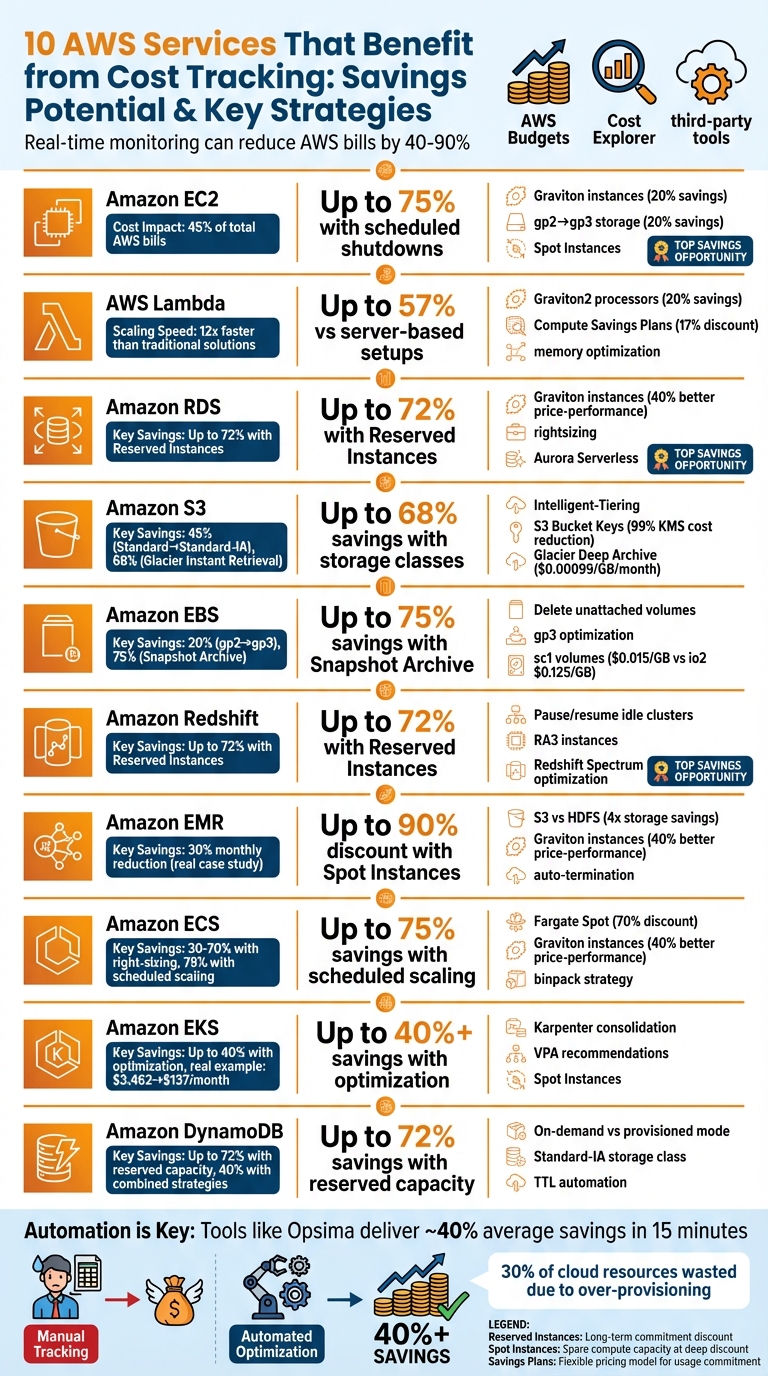
AWS Cost Savings by Service: Optimization Strategies and Potential Reductions
1. Amazon EC2
Real-time cost visibility
Amazon EC2 instances often dominate AWS bills, making up as much as 45% of an organization's total cloud expenses. Without a way to track spending in real time, costs can quickly escalate - especially when test instances are left running or auto-scaling provisions unnecessary capacity.
Real-time cost tracking shifts responsibility to the teams using the resources. Instead of waiting for end-of-month reports, engineers and application teams can immediately see how their actions affect spending. Tools like AWS Cost Explorer, which updates at least once every 24 hours, and AWS Cost Anomaly Detection, which provides instant alerts for unexpected spikes or misconfigurations, make this possible. This level of insight is crucial for monitoring how scaling decisions impact costs.
Scalability and usage fluctuation
The elastic nature of EC2 - scaling up to meet demand and scaling down during quieter periods - is one of its biggest advantages, but it also introduces cost risks. For instance, Auto Scaling can seamlessly add capacity during traffic surges, but without real-time monitoring, it’s hard to know if these adjustments are efficient or excessive.
Real-time tracking can uncover patterns like development environments running 24/7, even though developers only work during business hours. By scheduling non-production instances to shut down during idle times, organizations can cut costs by as much as 75%. These insights pave the way for smarter cost management.
Optimization opportunities
Once EC2 spending is clearly understood, several cost-saving strategies come into focus. For example, AWS Compute Optimizer uses machine learning to analyze usage and suggest adjustments, such as downsizing from an over-provisioned m5.2xlarge instance to a more appropriate m5.xlarge. Switching to ARM-based Graviton instances can lower compute costs by up to 20%, while Graviton3 processors offer up to 40% better price-performance compared to similar x86 instances.
Storage also presents optimization opportunities. Transitioning from older gp2 EBS volumes to gp3 can save up to 20% while boosting performance. Real-time tracking can help identify hidden costs, like unattached EBS volumes or outdated snapshots that continue to rack up charges even after instances are terminated. Platforms such as Opsima (https://opsima.ai) simplify commitment decisions for Savings Plans and Reserved Instances, dynamically adjusting coverage as usage patterns change to ensure you’re always paying the lowest possible rate.
2. AWS Lambda
Real-time cost visibility
AWS Lambda charges are based on the number of requests and the milliseconds of execution time. This detailed billing model makes it essential to monitor costs in real time. Understanding these costs is especially important when dealing with Lambda's ability to scale rapidly, as it can lead to unexpected fluctuations in expenses.
Lambda's automatic scaling - from zero to thousands of concurrent executions in just minutes - requires vigilant tracking. For example, Lambda can scale up to 12 times faster than traditional solutions, adding 1,000 concurrent executions every 10 seconds. While this speed is beneficial for handling spikes in traffic, it also means that a misconfigured function or unexpected surge could rack up thousands of dollars in charges before anyone notices. Tools like AWS Cost Anomaly Detection can help by sending automated alerts when spending patterns deviate from the norm.
Scalability and usage fluctuation
Lambda's ability to scale almost instantly is both a strength and a challenge. While it ensures performance during traffic surges, it also introduces the risk of runaway costs. For instance, even a small inefficiency - like an API call that takes 200 milliseconds longer than expected - can significantly increase expenses when multiplied across a high volume of function calls.
The free tier offers 1 million requests and 400,000 GB-seconds of compute time per month. However, issues such as recursive loops (e.g., a function unintentionally triggering itself) can quickly consume resources. Although AWS detects and throttles loops after about 16 iterations, costs can still accumulate before intervention.
Optimization opportunities
To manage these challenges, optimizing memory allocation and processor selection can make a big difference in reducing Lambda costs. Memory allocation is particularly important since CPU power scales with memory. Striking the right balance can lead to significant savings. AWS Compute Optimizer provides memory recommendations based on historical usage, but it requires at least 50 invocations over 14 days to deliver accurate insights. Another tool, AWS Lambda Power Tuning, allows teams to test various memory settings to find the most cost-effective configuration.
Switching to Graviton2 processors can also improve performance while cutting costs by up to 20%. For workloads that run consistently, Compute Savings Plans offer discounts of up to 17% on duration charges. Platforms like Opsima (https://opsima.ai) can simplify these decisions by automating cost management and dynamically adjusting coverage as usage patterns change.
Cost reduction potential
Optimizing Lambda usage can lead to substantial savings. Serverless applications, in general, can reduce costs by up to 57% compared to traditional server-based setups. For instance, Alert Logic managed to cut its cloud costs by 28% by focusing on cost-saving measures. Similarly, Delhivery reduced its cloud infrastructure expenses by 15% in just 50 days through automated cost monitoring and tracking.
Beyond compute costs, other expenses can quietly add up. For example, verbose logging for high-volume functions can drive up CloudWatch costs, which start at $0.50 per GB. Running Lambda within a VPC may also incur additional charges, such as $0.045 per hour for a NAT Gateway in the US-East-1 region, plus data processing fees. Real-time tracking helps highlight these hidden costs, allowing teams to adjust logging levels and optimize network configurations before they become a problem.
3. Amazon RDS
Real-time cost visibility
Amazon RDS provides performance metrics to Amazon CloudWatch every minute at no extra cost, giving you near real-time insights into how your database is performing. This continuous monitoring can help you catch and address over-provisioned instances before they quietly inflate your budget.
To better manage costs, consider using resource tags like "Database owner" or "Application owner." These tags make it easier to identify cost centers. Monitoring metrics like CPU and I/O utilization can also reveal instances running below 30% utilization, which may indicate they’re over-provisioned and ripe for downsizing.
Scalability and usage fluctuation
Tracking workload fluctuations is key to scaling efficiently. RDS costs often shift with workload changes. For read-heavy applications, horizontal scaling through read replicas is common. However, if your primary instance consistently operates below 30% utilization, maintaining those extra replicas could lead to unnecessary expenses. Real-time monitoring can also identify "zombie" databases - instances idle for 7–30 days - and unused instances flagged by AWS Trusted Advisor. These can be snapshotted and deleted to save costs. Keep in mind that manual snapshots, which aren’t automatically deleted, can also pile up and add to your expenses if left unmanaged.
Optimization opportunities
Once you have visibility into performance and workload fluctuations, you can focus on optimizing resources to cut costs even further. Rightsizing is one practical step - adjusting instance sizes based on utilization thresholds can significantly lower RDS expenses. For production environments, a 30% CPU and I/O utilization threshold is a good benchmark, while for non-production setups, you might aim for a more aggressive 50%. Just be sure the downsized instance still meets your peak I/O bandwidth needs, as different instance types have specific limits.
Storage optimization offers another way to save. Many development and staging workloads perform well on General Purpose SSD (gp2/gp3) storage, which is less expensive than Provisioned IOPS SSD. For applications with unpredictable usage patterns, Amazon Aurora Serverless adjusts capacity automatically, ensuring you only pay for what you use. Additionally, tools like the AWS Instance Scheduler can stop RDS instances during off-hours - like nights and weekends in development environments - further reducing unnecessary spending.
Cost reduction potential
By effectively tracking and managing RDS resources, you can achieve savings of up to 72% through Reserved Instances or Database Savings Plans for predictable workloads. AWS Graviton-powered instances offer up to 40% better price-performance compared to x86-based processors for database tasks. Using automated platforms to optimize commitment decisions ensures you consistently lock in the best rates available.
4. Amazon S3
Real-time cost visibility
Amazon S3 operates on a pay-as-you-go pricing model, meaning your costs directly reflect your usage. This makes real-time tracking a critical part of cost management. Tools like S3 Storage Lens simplify this process by providing a comprehensive dashboard that visualizes usage patterns and highlights opportunities to reduce expenses. For example, it can pinpoint costs tied to abandoned multi-part uploads, outdated object versions, or buckets without lifecycle rules.
This level of transparency shifts financial responsibility from central IT teams to individual engineering and business units. With detailed usage data, each team can take charge of its spending. Real-time cost anomaly detection adds another layer of control, alerting you to unusual spending patterns so you can address issues before they escalate. Additionally, AWS Cost Explorer provides up to 13 months of historical data and forecasts expenses for the next 18 months, offering a solid foundation for understanding how your usage trends affect costs.
Scalability and usage fluctuation
Amazon S3 costs aren't just about how much data you store; they also depend on factors like request types (e.g., PUT, GET, LIST) and data transfer across regions. If access patterns change and data remains in high-cost storage tiers like S3 Standard unnecessarily, expenses can quickly add up. As Cody Slingerland, a FinOps Certified Practitioner at CloudZero, explains:
"Ultimately, Amazon S3 aims to be a low-cost cloud storage service. Yet, many users still struggle to reduce S3 storage costs, and instead end up accruing thousands of dollars in unnecessary charges".
By tracking these fluctuations, you can identify when automated features, such as S3 Intelligent-Tiering, are helping you save money and when adjustments to storage classes might be needed.
Optimization opportunities
Once you have clear visibility into your usage, you can start tailoring your storage tiers to cut costs. For instance, moving data from S3 Standard to S3 Standard-Infrequent Access (IA) can save around 45%, while transitioning to S3 Glacier Instant Retrieval can save about 68% compared to S3 Standard-IA for long-term data. For the lowest storage costs, S3 Glacier Deep Archive is priced at just $0.00099 per GB per month.
If your data has unpredictable or shifting access patterns, S3 Intelligent-Tiering is a great tool. It automatically shifts objects between tiers with no retrieval fees and minimal monitoring effort. Additionally, Storage Class Analysis can review over 30 days of usage to recommend moving data to lower-cost tiers. To further trim costs, you can use S3 Select to retrieve only the specific data you need instead of downloading entire objects, which reduces both retrieval time and expenses.
Cost reduction potential
There’s significant potential to lower costs with strategic optimization. For example, using Amazon S3 Bucket Keys can cut AWS KMS encryption and decryption costs by up to 99%. Another smart move is batching smaller objects into a single file before uploading (using tools like tar), which reduces the number of billable API requests. Tools like Opsima can automate many of these optimizations, ensuring you consistently achieve the lowest possible costs for your S3 usage without requiring manual intervention.
5. Amazon EBS
Real-time cost visibility
Amazon EBS pricing is based on provisioned storage and IOPS, so keeping an eye on costs in real time is a must. Tools like AWS Cost Anomaly Detection and AWS Budgets can help by sending alerts and setting thresholds for unusual cost patterns, with updates available every 8–12 hours. Teams across engineering and business functions can track EBS expenses by project, department, or application using cost allocation tags. For a deeper dive, you can export cost data through AWS Cost and Usage Reports and analyze high-cost resource IDs using Amazon Athena. This level of proactive tracking is just as important for block storage as it is for compute and database services.
Scalability and usage fluctuation
Understanding the factors that influence EBS costs is critical, especially when dealing with scaling and fluctuating usage. Costs depend on aspects like the type of volume (SSD vs. HDD), storage size, IOPS, and throughput. Over-provisioning, however, can lead to unnecessary expenses by paying for capacity you don't use. For example, gp3 volumes offer 3,000 IOPS and 125 MB/s of throughput at no extra cost. Snapshot costs are another consideration - while snapshots only store the changes since the last backup, costs can quickly add up if they're not properly managed. On top of that, idle or unattached volumes will still incur charges even if they’re not linked to an active EC2 instance. Companies like Delhivery have demonstrated how effective cost monitoring can be, cutting overall cloud infrastructure costs by 15% in just 50 days.
Optimization opportunities
AWS offers several tools to help trim EBS costs. AWS Trusted Advisor can spot underutilized volumes, such as those averaging less than one IOPS per day over a week. Before deleting these idle volumes, you can create a snapshot to protect your data, a process that can be automated with Amazon Data Lifecycle Manager. For further optimization, AWS Compute Optimizer provides recommendations for resizing volumes or switching to more efficient types. For instance, moving from gp2 to gp3 volumes can save 20% - $0.08 per GB-month compared to $0.10 - and allows you to scale IOPS and throughput independently. If you’re storing backups that are rarely accessed, shifting them to EBS Snapshot Archive storage can cut costs by 75%, reducing the price to $0.0125 per GB-month versus $0.05 for standard snapshots.
Cost reduction potential
By combining these strategies, you can unlock significant savings. For example, Cold HDD (sc1) volumes cost $0.015 per GB-month, a fraction of the $0.125 per GB-month for Provisioned IOPS SSD (io2). Additionally, EBS-Optimized Instances ensure precise provisioning for better cost efficiency. Tools like Opsima can automate many of these optimizations across your EBS setup, helping you achieve the lowest possible costs with minimal manual effort.
6. Amazon Redshift
Real-time cost visibility
Managing Amazon Redshift expenses effectively requires near real-time tracking. While AWS Cost Explorer updates cost data every 24 hours, offering a solid overview of spending trends, teams that need quicker insights can implement custom tracking solutions to cut delays down to about 10 minutes. This is especially useful during performance tests, where immediate feedback on how infrastructure changes affect costs is critical. These fast updates enable teams to make quick adjustments when scaling.
AWS Trusted Advisor adds another layer of cost control by automatically identifying clusters that have been idle for seven days or show less than 5% average CPU usage. This helps teams pinpoint and eliminate unnecessary expenses. Furthermore, Cost Anomaly Detection alerts users to unusual spending patterns, helping prevent unexpected billing surprises.
Scalability and usage fluctuation
Once real-time visibility is in place, the next step is efficient scalability. Tracking usage patterns is essential for making the most of Redshift's scaling features. For instance, the pause and resume functionality can eliminate costs during idle periods, but it requires real-time data to identify when clusters aren’t being used. Similarly, the resize feature adjusts cluster capacity based on actual workload demand, which relies on monitoring usage fluctuations over time.
For long-term savings, Reserved Instances offer discounts of up to 72% compared to on-demand pricing. To maximize this benefit, understanding historical usage trends is crucial when layering cloud commitments across All Up-front, Partial Up-front, or No Up-front payment plans. Additionally, AWS Cost Explorer can forecast spending for up to 18 months, providing valuable insights for making informed commitment decisions. For Redshift Serverless, monitoring Redshift Processing Unit (RPU) consumption allows you to fine-tune limits, balancing performance needs with budget constraints.
Optimization opportunities
Once usage data is tracked, several cost-saving opportunities become apparent. For example, Query Monitoring Rules allow you to set performance thresholds and terminate queries that exceed resource limits, avoiding unnecessary costs. With Redshift Spectrum charging $5.00 per terabyte of data scanned, keeping an eye on scan rates can help identify inefficient queries that inflate costs. Storing infrequently accessed data in Amazon S3 and accessing it via Spectrum can further reduce high-performance storage expenses.
Using RA3 instances is another strategy, as they allow data sharing across clusters without duplication, cutting down on storage costs and simplifying data pipelines. Regularly reviewing and deleting unnecessary snapshots (which cost $0.023 per GB) can also help lower expenses. Lastly, Amazon Redshift Advisor provides automated suggestions for both performance enhancements and cost-saving measures.
Cost reduction potential
Like EC2 and Lambda, combining real-time insights with proactive cost management can lead to substantial savings in Redshift. Studies show that nearly 30% of cloud resources are wasted due to over-provisioning and poor cost awareness. By using Trusted Advisor's reports on underutilized clusters and automating pause-and-resume processes, you can cut costs during non-operational hours. For Serverless environments, setting appropriate RPU limits ensures predictable costs even during peak usage periods. Additionally, tools like Opsima can automate commitment management across your Redshift infrastructure, helping you consistently secure the lowest possible rates without manual effort.
7. Amazon EMR
Real-time cost visibility
Amazon EMR provides a high-level overview of cluster spending, but keeping tabs on costs for individual Spark jobs requires more detailed monitoring. With real-time cost visibility, organizations can implement chargeback models by aggregating expenses across departments or functional areas. By tracking metrics like vcore-seconds, memory MB-seconds, and storage GB-seconds, teams can allocate cluster costs based on the actual resource consumption of each application.
"You need complete, near real-time visibility of your cost and usage information to make informed decisions... the detailed, allocable cost data allows teams to have the visibility and details to be accountable of their own spend." - AWS Cloud Financial Management
Using unique tags (like cost-center) and standardized job naming conventions makes it easier to allocate costs accurately and quickly identify underutilized resources. Once this visibility is in place, EMR’s flexible scaling features help fine-tune cost control even further.
Scalability and usage fluctuation
Amazon EMR charges by the second (with a one-minute minimum), meaning Managed Scaling can dynamically adjust capacity to match workload demands while avoiding unnecessary idle costs. This ensures you're only paying for the resources you actually use, even during fluctuating usage periods.
Spot Instances are another cost-saving option, offering discounts of up to 90% compared to On-Demand pricing. While Master and Core nodes should typically use On-Demand instances for stability, Spot Instances are an excellent choice for task nodes handling variable workloads. Additionally, AWS Graviton-powered instances can deliver up to 40% better price-performance for analytical workloads compared to x86-based processors.
Optimization opportunities
Switching from HDFS on EBS to Amazon S3 can reduce storage costs by up to four times while also speeding up query performance. Converting data to Parquet format and using partitioning can further lower costs and improve efficiency. With real-time insights, these optimizations can be implemented quickly, ensuring ongoing savings.
Right-sizing YARN containers is another way to maximize EC2 utilization without over-allocating resources. Setting up automatic termination policies for idle clusters adds another layer of cost control, preventing unnecessary expenses during downtime.
Cost reduction potential
One global financial services provider managed to slash its monthly AWS costs by 30% by implementing auto-termination policies, migrating historical data to lower-cost storage tiers, and choosing the right EC2 instances. Tools like Opsima (https://opsima.ai) can automate these adjustments across multiple EMR clusters, ensuring you consistently achieve the lowest possible rates without manual effort. These strategies not only cut costs but also pave the way for further efficiency improvements across your AWS environment.
8. Amazon ECS
Real-time cost visibility
Tracking costs in Amazon ECS can get tricky when multiple containers share the same cluster. That’s where Split Cost Allocation Data comes in - it breaks down CPU and memory usage for individual tasks instead of lumping everything into a single cluster-wide expense report. This means you can pinpoint exactly how much each application costs, even on shared infrastructure.
"AWS Cost Management can provide CPU and memory usage data in the AWS Cost and Usage Report for each task on Amazon ECS, including tasks on Fargate and tasks on EC2. This data is called Split Cost Allocation Data." - Amazon ECS Developer Guide
By using managed and cost allocation tags, you can assign ECS expenses to specific services or departments. This real-time tracking also helps you compare the cost differences between Fargate (serverless) and EC2 launch types. It’s particularly useful for identifying where you’re trading infrastructure management for simplicity. However, keep an eye on data transfer charges - pulling container images through NAT gateways can add up fast.
Scalability and usage fluctuation
ECS charges by the second (with a one-minute minimum), so scaling your tasks efficiently can make a big difference in your bill. With Fargate, you’re billed for vCPU and memory usage from the moment an image starts downloading to when the task terminates. In contrast, EC2 launch types charge you for the full instance capacity, whether or not your containers are actively running.
"The goal will be efficient scaling as to not have more or less tasks running within a service than required for the current load." - Charu Khurana and John Formento, Solutions Architects, AWS
For fault-tolerant workloads, Fargate Spot offers discounts of up to 70%, making it a great option for tasks that can handle interruptions. In non-production environments, scheduled scaling can save over 75% by shutting down services during weekends or off-hours. Additionally, AWS Graviton-powered instances provide up to 40% better price-performance for containerized workloads compared to x86-based processors. These strategies allow for smarter scaling and more precise cost management.
Optimization opportunities
Fine-tuning your task definitions is a straightforward way to save money. Real-time tracking can highlight when your provisioned vCPU and memory exceed what’s actually being used, giving you a chance to adjust task configurations. AWS Compute Optimizer simplifies this process by analyzing CloudWatch metrics and recommending specific adjustments. Right-sizing alone can cut Fargate costs by 30–70%.
For additional savings, integrate VPC endpoints for Amazon ECR to avoid NAT gateway fees. If you’re using EC2 launch types, the "binpack" task placement strategy helps consolidate tasks onto fewer instances, reducing resource waste. A hybrid approach - using EC2 for steady workloads and Fargate for unpredictable traffic spikes - can strike the right balance between cost and performance.
Cost reduction potential
Scheduled scaling for development clusters (e.g., 8 hours/day, 5 days/week) can slash costs by more than 75%. Pairing right-sizing with Fargate Spot for eligible workloads offers savings of up to 70% compared to standard On-Demand rates. Tools like Opsima (https://opsima.ai) take it a step further by automating commitment management for ECS workloads, ensuring you always get the lowest rates across both Fargate and EC2 without manual effort. Over time, these strategies can significantly reduce your container infrastructure costs.
9. Amazon EKS
Real-time cost visibility
Managing costs in Amazon EKS can be tricky because a single EC2 instance often runs multiple containers, each supporting different teams or applications. Traditional tagging methods struggle here since dozens of pods may share a single instance.
AWS Split Cost Allocation Data helps by breaking down costs at the pod level. It scans Kubernetes attributes like namespace, node, and cluster to deliver precise cost allocation. Despite this, only 19% of organizations are accurately tracking costs for their Kubernetes environments, while 38% lack any monitoring altogether.
"Nearly half (49%) of those surveyed in CNCF's latest microsurvey report on Cloud Native and Kubernetes FinOps saw an increase in cloud spend driven by Kubernetes usage." – CNCF
Real-time tracking also highlights resource overuse, such as when container requests exceed actual needs. This can lead to spending on unused capacity, particularly during scaling events. For AI/ML workloads, pod-level tracking extends to specialized accelerators like NVIDIA and AMD GPUs, AWS Trainium, and AWS Inferentia. This granular tracking is essential for managing cost fluctuations as workloads expand.
Scalability and usage fluctuation
EKS costs can vary widely. The control plane costs $0.10 per hour per cluster, while compute, storage, and networking expenses fluctuate depending on demand. Tools like Karpenter and the Horizontal Pod Autoscaler (HPA) can trigger rapid scaling events, but without real-time monitoring, these changes might inflate your cloud bill without warning until the end of the month.
By consolidating isolated NodePools into a single pool and relaxing Topology Spread Constraints (e.g., changing maxSkew from 1 to 3), you can reduce the number of required replicas by up to 43%, helping to balance peak loads more efficiently.
Optimization opportunities
Once you have clear cost visibility and scaling insights, the next step is optimizing pod utilization. "Greedy workloads" - where resource requests far exceed actual usage - can prevent EC2 instances from being fully utilized, limiting the number of pods that can run on a node. Tools like the Vertical Pod Autoscaler (VPA) in recommendation mode can suggest resource adjustments without disrupting production.
Karpenter's consolidation feature also helps by continuously monitoring workloads and packing them onto fewer, better-sized instances. For workloads with unpredictable spikes, setting memory requests equal to limits can help avoid resource contention. Additionally, reviewing Pod Disruption Budgets (PDBs) ensures they aren't overly restrictive, which could hinder autoscaling. Cost tracking tools like Kubecost can identify underutilized pods with low network traffic, making it easier to delete or scale down unused deployments.
Cost reduction potential
Optimizing resource configurations can lead to significant savings. For example, a Kubecost analysis revealed that by fine-tuning node configurations, monthly costs could drop from $3,462.57 to $137.24. Further savings can be achieved by prioritizing Reserved Instances, Savings Plans, or Spot Instances over On-Demand capacity. Features like the Cluster Autoscaler Priority Expander make it easier to implement these cost-saving measures.
Opsima (https://opsima.ai) automates commitment management for EKS, ensuring the lowest rates across EC2 and Fargate. When combined with strategies like unified NodePools and adjusted topology constraints, these approaches can reduce Kubernetes infrastructure costs by up to 40% while maintaining the flexibility your teams need.
10. Amazon DynamoDB
Real-time cost visibility
When it comes to managing costs in Amazon DynamoDB, having real-time visibility is crucial. By default, AWS Cost Explorer provides an aggregated view of DynamoDB expenses, but it doesn’t break them down by table unless you’ve set up proper tagging. Without this, you might only see a single line item for all your DynamoDB usage, making it tough to identify which tables are driving up costs.
To address this, you can tag each table with a table_name tag. This allows you to filter your costs in AWS Cost Explorer and analyze monthly expenses for individual tables. Additionally, keeping an eye on CloudWatch metrics, like ConsumedReadCapacityUnits and ConsumedWriteCapacityUnits, can help you ensure that your capacity settings align with actual usage patterns. This real-time tracking can also highlight inefficiencies - frequent Scan operations, for instance, consume far more capacity than targeted Query requests. These insights are vital when evaluating how DynamoDB’s scaling options affect your overall costs.
Scalability and usage fluctuation
DynamoDB’s automatic scaling is a double-edged sword - it offers flexibility but can make cost management tricky. You have two billing modes to choose from:
- On-demand mode: Charges per request, making it ideal for unpredictable traffic patterns.
- Provisioned mode: Bills based on pre-set capacity units, but you’ll pay for that capacity hourly, whether you use it or not.
For workloads that fluctuate, on-demand mode ensures you’re not paying for unused capacity. On the other hand, steady workloads benefit from provisioned mode with auto scaling, which adjusts capacity as needed while keeping costs predictable. Reviewing your consumed capacity over a 30-day period can help you decide which mode best suits each table’s usage patterns.
Optimization opportunities
Identifying and acting on usage patterns can unlock significant cost savings. For example, if a table’s CloudWatch metrics show zero activity over 30 days, it’s time to either delete it or switch it to on-demand mode to avoid unnecessary throughput costs. For tables with infrequent access, using the Standard-IA storage class can cut storage expenses, while limiting the attributes projected in Global Secondary Indexes (GSIs) helps reduce both write and storage costs.
Instead of projecting all attributes, opt for KEYS_ONLY or INCLUDE to focus on what’s truly necessary. Another effective strategy is enabling Time to Live (TTL), which automatically deletes expired items at no additional cost, helping to manage storage growth. For large objects, consider storing them in Amazon S3 and linking to them via S3 URLs in DynamoDB. This approach minimizes high throughput charges.
Cost reduction potential
For predictable workloads, reserved capacity can slash costs by up to 72% compared to on-demand pricing. Real-world examples highlight the impact of cost optimization: Delhivery reduced their AWS costs by 15% in just 50 days through automated monitoring, while Alert Logic achieved a 28% cost reduction by implementing targeted strategies.
Tools like Opsima (https://opsima.ai) simplify commitment management for DynamoDB and other AWS services, ensuring you always pay the lowest rates without manual intervention. By combining these strategies, you can cut DynamoDB costs by as much as 40% - all while maintaining application performance. This aligns perfectly with the broader goal of proactive, automated cost management.
AWS re:Invent 2023 - Optimize cost and performance and track progress toward mitigation (ARC319)
Conclusion
Tracking costs in real-time is a game-changer for managing AWS expenses. When you have a clear view of where your money is going - right down to specific EC2 instances, Lambda functions, or DynamoDB tables - you can take immediate action to avoid those end-of-month billing surprises. Tools like AWS Budgets provide near-instant insights into spending trends. This level of visibility allows you to spot anomalies early, adjust resources before waste adds up, and choose the best pricing models - whether it's Savings Plans, Reserved Instances, or Spot Instances - to maximize cost efficiency.
This kind of insight doesn’t just give you control; it directly leads to measurable savings. For example, using Savings Plans or Reserved Instances can cut costs by as much as 72%, while Spot Instances can reduce expenses by up to 90%. Real-world users have shown that automated cost tracking can slash cloud bills significantly in just a matter of days.
But here’s the catch: without automation, achieving these savings can be time-consuming and labor-intensive. Manual tracking means constant monitoring, frequent adjustments, and juggling these tasks while ensuring your applications run seamlessly. That’s why automation is such a game-changer.
This is where Opsima steps in. Opsima (https://opsima.ai) simplifies the process by automating commitment management across services like EC2, RDS, and Lambda. It ensures you consistently pay the lowest possible rates without making any changes to your infrastructure. On average, Opsima delivers around 40% cost savings, with results starting in as little as 15 minutes. As the platform itself explains:
"In just 15 minutes, Opsima starts reducing your AWS costs automatically, risk-free, and without touching your infrastructure".
FAQs
How does real-time cost tracking help save money on AWS services?
Real-time cost tracking gives you an up-to-the-minute view of how your AWS resources are eating into your budget. By keeping a constant eye on usage, you can quickly spot and fix inefficiencies like idle EC2 instances, over-provisioned storage, or Lambda functions that are using more memory or runtime than they need. This kind of oversight can lead to savings of 10–25% or even more.
Having real-time data also means you're better equipped to handle unexpected cost spikes, like a surge in API calls or higher-than-usual data transfer fees. You can act immediately by tweaking auto-scaling policies or halting non-essential workloads. Automated tools like Opsima take this a step further by monitoring AWS usage around the clock, suggesting optimizations, and even applying cost-saving configurations automatically. This can slash cloud expenses by as much as 40%.
What are the best ways to reduce AWS Lambda costs?
To keep your AWS Lambda costs under control, start by adjusting memory and CPU allocations to fit your needs. Choose the smallest memory size that still delivers the performance you require. This approach helps cut down on both per-GB-second charges and CPU usage. Tools like AWS Lambda Power Tuning can guide you in finding the most economical configuration for your workloads.
Another cost-saving move is switching to Graviton2 (ARM) runtimes. These can deliver up to 34% better price-performance, making them a smart choice for many applications. On top of that, writing efficient code can make a big difference. Focus on reducing execution time by optimizing loops, using native libraries, and processing data in-memory whenever possible.
Be mindful of hidden costs, such as unnecessary VPC networking, excessive logging, and large data transfers. These can quietly add up over time. To stay on top of your expenses, consider using platforms like Opsima. They offer real-time cost monitoring and automated recommendations to help you keep your Lambda functions cost-effective without compromising performance.
By implementing these strategies, you can save on AWS Lambda costs while ensuring your applications run smoothly.