7 Ways to Optimize EC2 Spending Without Downtime


AWS EC2 costs can add up fast, but you can reduce expenses without affecting performance. Here are seven practical ways to cut costs while keeping your applications running smoothly:
- Right-Size Instances: Match instance size to actual usage with tools like AWS Compute Optimizer, saving up to 25%.
- Use Auto Scaling Groups: Automatically adjust the number of instances based on demand, avoiding idle capacity.
- Leverage Savings Plans: Commit to consistent usage for discounts of up to 72%.
- Spot Instances: Save up to 90% by using spare capacity for flexible workloads.
- Optimize EBS Volumes: Switch to cost-effective storage types like gp3 and clean up unused volumes.
- Schedule Non-Production Instances: Shut down development or testing environments during off-hours to save up to 70%.
- Remove Idle Resources: Delete unused instances, unattached EBS volumes, and outdated snapshots for immediate savings.
These strategies, combined with tools like Opsima for automation, can reduce cloud costs by over 30%. Start with small changes, like cleaning up idle resources, and scale up to advanced methods like Spot Instances and Savings Plans.
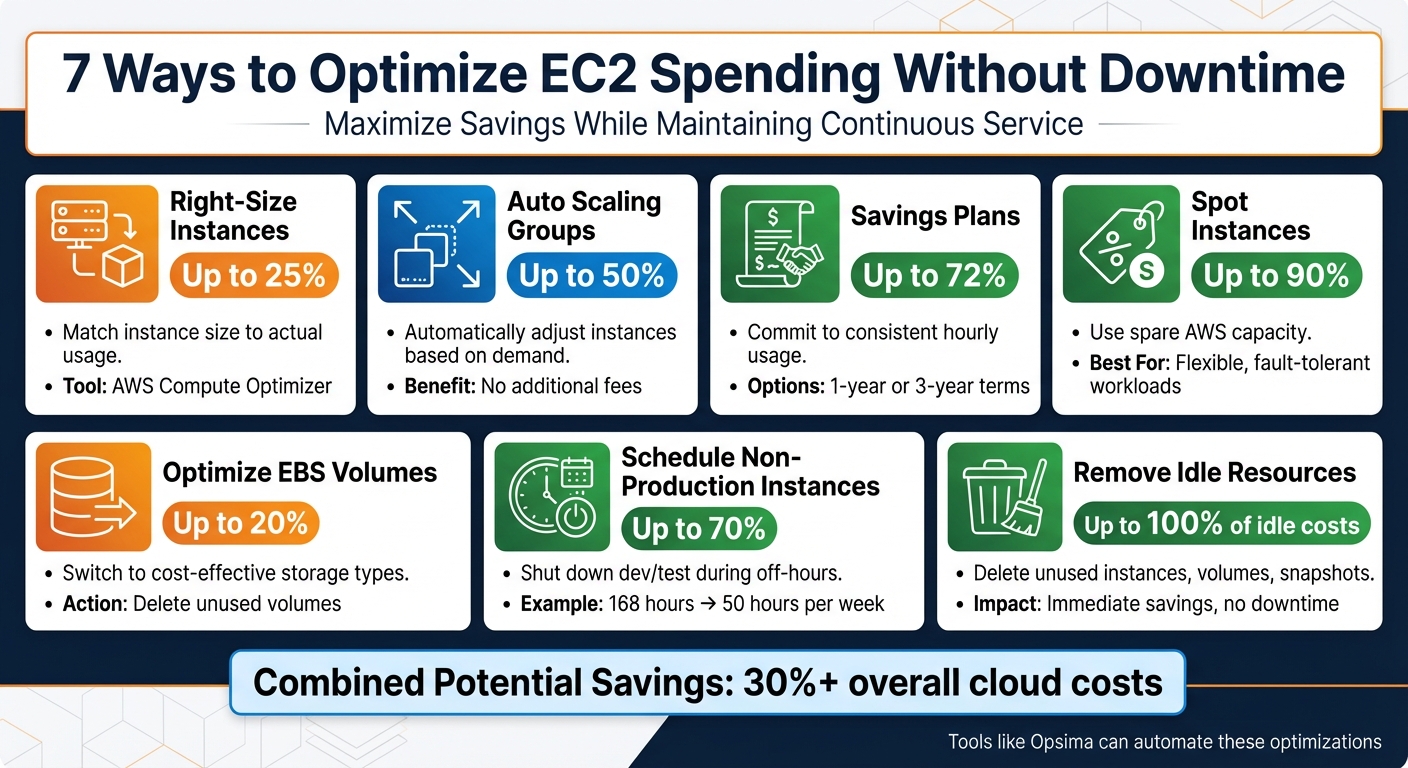
7 EC2 Cost Optimization Strategies with Potential Savings Percentages
AWS re:Invent 2023 - Smart savings: Amazon EC2 cost-optimization strategies (CMP211)
1. Right-Size EC2 Instances
Rightsizing involves aligning your EC2 instance types and sizes with your workload's actual requirements. Many teams tend to overprovision instances as a precaution, but this often results in unnecessary costs due to idle capacity. To address this, start by closely monitoring your resource usage to identify where you're overprovisioned.
The first step is to track real resource usage. Install the CloudWatch agent to collect memory metrics, which aren't included in standard EC2 monitoring. Over a two-week period, monitor key metrics like vCPU, memory, network throughput, and disk I/O. If your utilization consistently stays below 40%, chances are you're overprovisioned.
To simplify this process, use AWS Compute Optimizer, which analyzes historical data to recommend better-suited instance types. This tool can help reduce costs by up to 25%. For example, it might suggest switching from general-purpose M-series instances to compute-optimized C-series or burstable T-series for workloads with cyclical demands. Additionally, upgrading to newer-generation instances like AWS Graviton can boost price-performance by up to 40% - all without requiring changes to your architecture.
For a seamless transition, leverage Auto Scaling Groups to perform rolling updates. This method allows you to launch correctly-sized instances while gradually retiring the oversized ones, ensuring your application remains operational throughout the optimization process.
"Rightsizing should reduce cost without degrading performance. That only happens when it's ongoing, not occasional." - Steven O'Dwyer, Senior FinOps Specialist, ProsperOps
2. Implement Auto Scaling Groups
Auto Scaling Groups (ASGs) take cost optimization a step further by dynamically adjusting the number of EC2 instances to match your workload. They automatically scale up during high demand and scale down during quieter periods, ensuring you only pay for the compute power you actually need. This approach eliminates the waste of running idle servers while maintaining availability during peak times.
ASGs don’t come with additional fees; you’ll only incur costs for the EC2 instances and any CloudWatch alarms you use. They also enhance reliability by performing regular health checks and automatically replacing any unhealthy instances. By distributing instances across multiple Availability Zones, ASGs help safeguard against downtime caused by zonal failures.
You can fine-tune scaling strategies to match your specific needs:
- Dynamic scaling reacts to real-time metrics, like CPU utilization or request counts.
- Scheduled scaling handles predictable changes, such as shutting down non-essential environments overnight, which can cut costs by nearly 50%.
- Predictive scaling uses machine learning to anticipate traffic spikes and adjust capacity ahead of time.
For web services, scaling triggers like request count or latency often work better than relying solely on CPU utilization.
ASGs also support a Mixed Instances Policy, letting you use a mix of On-Demand and Spot Instances. Spot Instances can reduce costs by up to 90%, but to avoid interruptions, diversify across instance types and Availability Zones. Use the price-capacity-optimized allocation strategy to strike a balance between cost efficiency and availability. This setup helps maintain performance while keeping expenses low.
Other key features include cooldown periods to prevent unnecessary scaling adjustments and clear minimum and maximum capacity limits to control costs during traffic spikes or unexpected errors. For applications with long startup times, consider Warm Pools. These allow you to keep pre-initialized instances ready to scale up quickly without the cost of keeping them fully active.
3. Use Savings Plans
Savings Plans provide a smart way to cut AWS costs while maintaining uninterrupted service. These plans operate on a commitment-based pricing model, offering billing discounts in exchange for a consistent hourly spend commitment - like $10 per hour - over a one- or three-year term. AWS automatically applies these discounts to your On-Demand usage, ensuring seamless service with no downtime.
There are two primary types of Savings Plans:
- Compute Savings Plans: These offer up to 66% savings and provide maximum flexibility. The discounts apply automatically, no matter the instance family, size, Availability Zone, Region, operating system, or tenancy. They even extend to services like Fargate and Lambda.
- EC2 Instance Savings Plans: These deliver even greater discounts, up to 72%, but require a commitment to a specific instance family within a single Region. If your usage goes beyond the committed hourly amount, the excess is billed at standard On-Demand rates.
Getting started is simple. AWS Cost Explorer can analyze your past usage and recommend an optimal hourly commitment. Before making a commitment, it's wise to right-size your instances using tools like AWS Trusted Advisor or Compute Optimizer. This ensures your Savings Plan aligns with your actual workload needs, preventing you from overcommitting to unnecessary capacity. To remain flexible as your needs change, consider a laddered purchasing approach - buying plans incrementally over time. If you're managing multiple accounts, purchase Savings Plans through your AWS Organizations management account to share the discounts across all member accounts, maximizing their value.
You can choose from three payment options:
- All Upfront: Offers the highest discount by paying the full amount upfront.
- Partial Upfront: Requires at least half the cost upfront, with the rest billed monthly.
- No Upfront: Spreads the entire cost across monthly payments.
For Windows Server workloads, Savings Plans typically deliver 25% to 40% average savings, with 3-year All Upfront EC2 Instance Savings Plans reaching up to 73% savings.
4. Use Spot Instances Strategically
Spot Instances are a great way to cut costs on AWS, offering discounts of up to 90% by leveraging unused EC2 capacity. They perform just like regular instances, but there's a catch: AWS can reclaim them with just two minutes' notice. Because of this, they're best suited for workloads that can handle interruptions.
Cost Savings Potential
Plenty of companies have already seen huge savings by using Spot Instances. For example, Lyft, Salesforce, the NFL, and Delivery Hero have all reported saving as much as 70% or significantly reducing their monthly cloud costs.
Best Workloads for Spot Instances
Spot Instances shine when used for stateless, fault-tolerant, and flexible applications. They're particularly effective for:
- Big data processing
- Containerized workloads
- CI/CD pipelines
- High-performance computing
- Rendering tasks
- Batch processing
However, they're not a good fit for stateful or tightly coupled workloads. On average, Spot Instances are interrupted less than 5% of the time, making them a reliable option for many scenarios.
Minimizing Downtime Risks
To keep your applications running smoothly, it's smart to spread your requests across at least 10 different instance types and all Availability Zones within your region. This approach taps into multiple capacity pools, reducing the chances of interruptions.
Using the "price-capacity-optimized" allocation strategy can further help by automatically selecting instances from the most available and cost-effective pools. You can also enable Capacity Rebalancing in Auto Scaling groups, which proactively replaces instances at risk of interruption before the two-minute notice arrives. For added stability, combine Spot Instances with On-Demand or Savings Plans to handle your baseline capacity. This way, you can keep your core applications stable while still saving money.
Simplifying Spot Instance Management
AWS makes it easy to work with Spot Instances. Services like EMR, ECS, EKS, Batch, and SageMaker handle Spot Instance lifecycles for you. If you're building a custom solution, Auto Scaling groups or EC2 Fleet can automatically request replacement capacity when interruptions occur.
For long-running tasks, you can use Amazon EventBridge to capture interruption notices and trigger checkpoints, saving progress to S3 or a database. Instead of locking yourself into specific instance types, consider using attribute-based selection. This lets you specify your resource needs - like vCPUs, memory, or storage - and AWS will find all compatible Spot pools, giving you better access to available capacity.
5. Optimize EBS Volumes
EBS costs can easily slip under the radar but can add up quickly when storage is over-allocated or when higher-performance volumes are used unnecessarily. Luckily, you can reduce these costs without downtime or sacrificing performance. Here's how to make the most of your EBS spending.
Cost Savings Potential
Switching from gp2 to gp3 volumes can save you up to 20%. The key difference? With gp3, you can provision IOPS and throughput separately from storage size. This means you’re no longer stuck paying for extra storage just to get better performance.
Another cost drain is unattached volumes, which continue to generate charges even when not in use. AWS Trusted Advisor can help you spot volumes with less than 1 IOPS over seven days. Once identified, you can delete these volumes after creating a snapshot for backup.
Zero Downtime Impact
The AWS Elastic Volumes feature lets you modify volume types, sizes, IOPS, and throughput on the fly. According to the Amazon EBS User Guide:
"With Amazon EBS Elastic Volumes, you can increase the volume size, change the volume type, or adjust the performance of your EBS volumes... without detaching the volume or restarting the instance".
These changes are typically quick, taking anywhere from a few minutes to six hours, depending on the size of the volume.
Ease of Implementation
Tools like AWS Compute Optimizer or CloudWatch make it simple to identify volumes with low IOPS or throughput. Once identified, you can downgrade these volumes to more cost-effective types like gp3 or st1. For data that’s rarely accessed, consider switching to sc1 volumes. Additionally, use Amazon Data Lifecycle Manager to automate snapshot creation and deletion, helping you avoid unnecessary snapshot costs.
6. Schedule Non-Production Instances
Managing non-production environments effectively is another smart way to cut down on EC2 costs. These environments, like development or testing, don’t need to run 24/7. Yet, many organizations leave them running around the clock, racking up unnecessary expenses during off-hours. By scheduling non-production instances, you can trim waste without touching production workloads.
Cost Savings Potential
Cutting non-production runtimes from 168 hours a week to just 50 hours can slash costs by as much as 70%. Even a simple adjustment, like shutting down instances for 12 hours a day, can reduce operational costs by nearly half.
Take the example of Jamaica Public Service Company Limited (JPS). After moving to Amazon RDS and using EC2 for API services, they adopted AWS’s Instance Scheduler to manage non-production environments. By syncing instance availability with team work hours, JPS achieved a 40% reduction in their overall costs.
Zero Downtime Impact
What’s great about this approach is that it doesn’t interfere with customer-facing applications. Since non-production environments don’t handle live traffic, stopping them during off-hours won’t disrupt production or user experience. These instances can start back up automatically when needed, ensuring teams are ready to work without delays. For even quicker restarts, enabling hibernation can save the in-memory state of stopped instances, so they pick up exactly where they left off.
Ease of Implementation
Setting up a scheduling strategy is straightforward and well worth the effort. Tools like AWS’s Instance Scheduler can handle this automatically by using resource tags, such as a "Schedule" tag, to control when instances start and stop. This tool runs on AWS Lambda and DynamoDB, costing about $10–$13 per month - easily covered by the savings it generates. Alternatively, AWS Systems Manager Quick Setup offers a Resource Scheduler for similar functionality.
A good starting point is to roll out scheduling for development environments. Once you see the results, expand the strategy to staging and QA environments. Use AWS Cost Explorer with tag-based filters to track the financial impact of your scheduling policies. Keep in mind, though, that while stopping instances eliminates compute charges, you’ll still incur costs for associated resources like EBS volumes, unattached Elastic IP addresses, and snapshots.
7. Remove Idle and Unused Resources
Managing cloud costs effectively isn't just about rightsizing or scheduling - it's also about eliminating waste. One of the quickest ways to trim expenses is by identifying and removing idle resources. Think unused EC2 instances, unattached EBS volumes, outdated snapshots, and Elastic IPs that aren't tied to active workloads. These resources silently rack up charges, even if they're not doing anything. Here's the silver lining: cleaning up these unused assets won't disrupt production workloads and can lead to immediate savings.
Cost Savings Potential
Cutting out idle resources can save you up to 100% of their associated costs. For example, in May 2025, a Cloud & DevOps Engineer named YG slashed a $4,300 monthly cloud bill by 40% - without any downtime. Quick actions, like deleting unattached EBS volumes and old snapshots, resulted in a 10% cost reduction within just one day. When combined with other optimization efforts, total savings can reach up to 40%.
The costs of neglecting idle resources add up fast. AWS imposes a penalty fee for every unused Elastic IP, while unattached EBS volumes continue to incur storage and performance charges. Over time, these forgotten assets can drain thousands of dollars from your budget. By addressing these issues, you can achieve significant savings without sacrificing service availability.
Zero Downtime Impact
This cleanup strategy is completely safe for production environments. Deleting unused resources like unattached EBS volumes, idle Load Balancers, and Elastic IPs has no impact on active applications. These resources aren’t serving traffic or supporting workloads, so removing them won't cause disruptions.
To avoid accidental deletions, consider a "notify and wait" approach. Tag idle resources for removal, notify the relevant owner, and proceed with termination only if no one objects after a set waiting period. For storage resources like EBS volumes or RDS databases, always create a final snapshot before deletion. In the case of RDS instances, you might even stop them for up to seven days to confirm they're unnecessary before permanently deleting them.
Ease of Implementation
Cleaning up idle resources is straightforward and complements other cost-saving strategies. Tools like AWS Compute Optimizer and Trusted Advisor make this process easier by identifying underutilized resources. For example, Compute Optimizer analyzes usage metrics over a 14-day period to highlight idle EC2 instances, Auto Scaling groups, and EBS volumes. Trusted Advisor, on the other hand, flags low-activity resources like EBS volumes and Load Balancers handling fewer than 100 requests in a week. These recommendations are centralized in the Cost Optimization Hub, categorizing tasks like "Stop" or "Delete" as low effort with high savings potential. Compute Optimizer updates its idle resource recommendations daily, ensuring you always have up-to-date insights.
For ongoing maintenance, consider automating the process. A monthly Lambda job can identify and remove unused resources. Establishing strict tagging policies - using tags like Owner, Project, and ExpiryDate - helps maintain resource hygiene. Enabling "Delete on Termination" ensures that resources are automatically cleaned up when they're no longer needed.
"The easiest way to reduce operational costs is to turn off instances that are no longer being used." - AWS Whitepaper, Tips for Right Sizing
Applicability to Different Workloads
This approach works across all environments. Development and testing setups often leave behind temporary instances and volumes after projects wrap up, making them ideal candidates for cleanup. In production environments, you can target old snapshots, unused Elastic IPs, and idle NAT Gateways that no longer serve active route tables. Even Auto Scaling groups can be scaled down to zero or deleted entirely if they're no longer in use.
The secret to success lies in consistency. Conduct monthly audits using AWS Cost Explorer and CloudWatch to catch waste before it piles up. As one AWS whitepaper aptly puts it:
"Cost optimization is not a project, it's a way of life".
Conclusion
Reducing EC2 costs without disrupting operations involves a mix of strategies that work together seamlessly. By focusing on rightsizing instances, setting up auto scaling, using Savings Plans and Spot Instances, optimizing EBS volumes, scheduling non-production resources, and cutting out idle waste, you tackle three key areas: compute options, pricing models, and attached resources. Together, these approaches can lead to measurable cost savings.
Here’s a breakdown of potential savings: Savings Plans can cut costs by up to 72%, Spot Instances by 90%, Graviton-based instances by 40%, and scheduling non-production environments by 70%. Altogether, these strategies can reduce expenses by more than 30%.
But cost optimization isn’t a one-and-done task - it’s an ongoing effort. As an AWS whitepaper puts it, "Cost optimization is not a project, it's a way of life." Workloads evolve, new instance types are introduced, and usage patterns change. What fits perfectly in January might be oversized by March. While manual adjustments might work for smaller setups, growing infrastructures demand automation.
This is where Opsima’s tools come in. They monitor and fine-tune resources in real time, manage commitment lifecycles, and automate adjustments far beyond what manual processes can achieve. For example, they can act on Spot interruption notices within two minutes, simulate changes to ensure performance stays intact, and remove idle resources before they drain your budget. Companies using automated optimization have even reported up to six times higher engineering productivity.
Start by addressing the basics: eliminate idle resources and schedule non-production instances. Then, layer in rightsizing, smarter pricing models, and automation to build a scalable, cost-effective cloud infrastructure - all while ensuring your applications run smoothly.
FAQs
How do I choose the right size for my EC2 instances to save costs without affecting performance?
To determine the best size for your EC2 instances, start by tracking your workloads over a period of at least 14 days. This helps you gather a clear picture of typical usage patterns. Pay close attention to metrics like CPU utilization, memory usage, network throughput, and disk I/O. Tools such as Amazon CloudWatch and EC2 Usage Reports are invaluable for collecting detailed performance insights.
Look for instances that show low utilization - specifically, those where CPU and memory usage consistently stay below 40%. These could be great candidates for downsizing. AWS offers tools like the Instance Type Recommendation feature, which can suggest smaller, more cost-efficient instance types based on the metrics you've observed.
Before applying changes to your production environment, test the recommended instance size in a non-production setting. This ensures the new configuration can handle your workload effectively. Once you've confirmed its performance, update the instance type and monitor it for another two weeks to make sure everything operates as expected. Regularly reviewing your usage data and fine-tuning instance sizes is a smart way to balance cost savings with reliable performance.
What are the potential risks of using Spot Instances, and how can you minimize them?
Spot Instances are a great way to cut costs by utilizing unused EC2 capacity, but there’s a catch - they can be interrupted at any moment. AWS may reclaim a Spot Instance due to factors like increased capacity demands, hitting your maximum price limit, or other constraints. When this happens, your instance could stop, terminate, or hibernate, which might result in data loss or downtime if your workloads aren’t prepared for sudden interruptions.
To reduce these risks, consider using Auto Scaling groups or EC2 Fleet to quickly replace interrupted instances. Choosing flexible instance types and spreading workloads across multiple Availability Zones can also lower the chances of interruptions. For critical data, make sure to store it in durable options like Amazon S3, EBS, or DynamoDB. When designing workloads, aim for stateless setups or checkpoint-driven tasks so they can pick up where they left off on a new instance. Also, keep an eye on AWS interruption notices and rebalance signals to shut down or hibernate instances gracefully before they’re reclaimed. Following these strategies allows you to enjoy cost savings while maintaining application reliability.
What’s the difference between Savings Plans and Reserved Instances for reducing EC2 costs?
Savings Plans and Reserved Instances both help you save money compared to on-demand pricing, but they cater to different needs when it comes to flexibility and savings potential.
With Savings Plans, you commit to spending a fixed amount per hour (e.g., $10 per hour) over one or three years. These plans automatically apply discounts to eligible EC2, Lambda, or Fargate usage, no matter the instance type, family, or region. This makes them a great option if your resource requirements might shift over time. However, the savings are generally moderate compared to other options.
Reserved Instances (RIs), on the other hand, can save you up to 72% off on-demand rates. The catch? You’ll need to commit to a specific instance type, region, and tenancy. While this lack of flexibility might not work for everyone, RIs are perfect for workloads that are predictable and steady, where you know exactly what resources you’ll need.
To sum it up: go with Savings Plans if you value flexibility, and opt for RIs if you’re aiming for maximum savings on consistent resource usage.