Maximizing AWS Savings Plan Utilization


AWS Savings Plans can save you up to 72% on cloud costs, but only if utilized effectively. Misaligned commitments or fluctuating workloads often lead to wasted spend or missed savings. Here’s how to ensure you’re getting the most value:
- Understand Plan Options: Choose from Compute, EC2 Instance, Database, or SageMaker Savings Plans based on your needs and flexibility.
- Track Key Metrics: Focus on utilization (percentage of your commitment used) and coverage (percentage of eligible usage covered by discounts). Aim for 98-100% utilization and over 80% coverage.
- Analyze Usage Patterns: Use AWS Cost Explorer to identify consistent workloads and align commitments with your baseline usage.
- Avoid Overcommitment: Commit to 70-80% of your steady usage to balance savings and flexibility.
- Optimize Across Accounts: Use a dedicated account for purchases or prioritize group sharing to maximize savings across multi-account setups.
- Stagger Commitments: Adopt a rolling strategy with staggered expiration dates for flexibility in adjusting commitments.
Tools like AWS Cost Explorer, Purchase Analyzer, and Opsima can simplify monitoring and optimization, ensuring you maintain high utilization and minimize unnecessary costs. Regular reviews and adjustments are key to long-term savings.
AWS Savings Plans Explained: Save Big Without Overcommitting
Step 1: Review Your Current Savings Plan Utilization
AWS Savings Plan Utilization vs Coverage Metrics Comparison
Before making any adjustments to your Savings Plans, it's crucial to assess how well your existing commitments are working. This means diving into historical spend data to spot areas where you're either overcommitting (paying for unused capacity) or under-committing (missing out on savings by running workloads at full On-Demand rates).
Analyze Historical Spend and Usage Patterns
AWS Cost Explorer is your go-to tool for this analysis. It offers detailed reports on Savings Plan performance with data available at hourly, daily, or monthly intervals. Keep in mind that cost and usage data may take up to 24 hours to reflect changes after launching resources or purchasing a plan.
Start by reviewing your Savings Plans Inventory. This will help you track active plans and their expiration dates, so you're prepared for any potential cost increases when plans expire.
Next, make use of the Purchase Analyzer. This tool lets you simulate "what-if" scenarios by applying hypothetical commitment amounts to your historical data. It shows how your savings and coverage would have looked based on past usage. Typically, the analyzer uses a 60-day lookback period to identify patterns, but ensure this period aligns with your expected future usage since past trends don't always predict future needs.
For a more detailed view, filter your reports by member account, AWS Region, instance family, and Savings Plan type. This helps pinpoint inefficiencies. If you're using a management account, you'll see aggregated data for your entire Consolidated Billing family, while member accounts only show their specific usage.
Once you've reviewed your historical data, focus on the metrics that measure Savings Plan performance.
Understand Utilization and Coverage Metrics
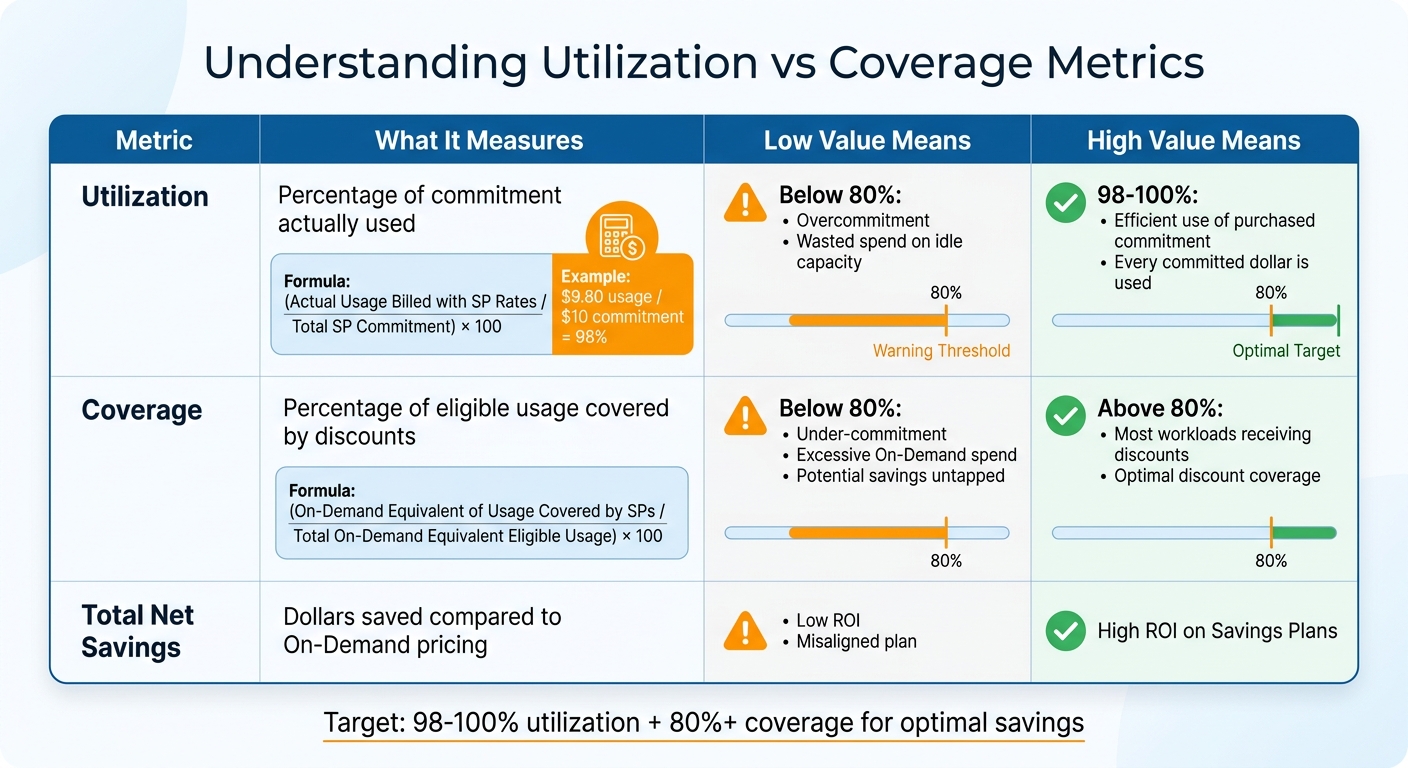
Two key metrics reveal how well your Savings Plans are performing: utilization and coverage.
-
Utilization shows whether you're fully using your commitment. It's calculated as:
(Actual Usage Billed with SP Rates / Total SP Commitment) × 100.
For example, if you have a $10 per hour commitment and your usage billed at Savings Plan rates is $9.80, your utilization rate is 98%. Ideally, you want 100% utilization, meaning every committed dollar is being used effectively. If utilization drops below 80%, it indicates overcommitment and wasted spend on idle capacity. -
Coverage measures how much of your eligible usage benefits from Savings Plan discounts. It's calculated as:
(On-Demand Equivalent of Usage Covered by SPs / Total On-Demand Equivalent Eligible Usage) × 100.
Low coverage (under 80%) for stable workloads signals under-commitment, leaving potential savings untapped. The Coverage Report highlights how much On-Demand spend isn't covered, representing eligible usage still billed at full price.
| Metric | What It Measures | Low Value Means | High Value Means |
|---|---|---|---|
| Utilization | Percentage of commitment actually used | Overcommitment; wasted spend | Efficient use of purchased commitment |
| Coverage | Percentage of eligible usage covered | Under-commitment; excessive On-Demand | Most workloads receiving discounts |
| Total Net Savings | Dollars saved compared to On-Demand | Low ROI or misaligned plan | High ROI on Savings Plans |
Identify Misaligned Commitments
Misalignment happens when your commitments don't align with your actual resource usage. Since Savings Plans are applied hourly, any unused commitment in one hour doesn't roll over to the next. Even small mismatches can lead to significant waste over time.
Look for low utilization (below 80%) as a sign of overcommitment. Similarly, low coverage indicates that many eligible workloads aren't benefiting from discounts. If your monthly reports show high On-Demand equivalent spending despite having active plans, your current commitments may not be covering your baseline workload. For EC2 Instance Savings Plans, low utilization could mean your usage has shifted to different instance families or regions not covered by your plan.
To pinpoint specific inefficiencies, use the Utilization Report to identify hours with low usage. If workloads have shifted to other instance families or regions, you might end up paying for both unused Savings Plan commitments and additional On-Demand usage.
Finally, set up AWS Budgets for Savings Plans utilization and coverage. These budgets can send alerts when performance falls below your thresholds, helping you address issues before they become costly.
Step 2: Match Commitments to Consistent Usage Patterns
After reviewing your current usage, the next step is to align your commitments with workloads that are stable and predictable. This approach helps you avoid the pitfalls of under- or over-commitment. The idea is simple: commit to consistent, steady usage and let variable or unpredictable workloads run on On-Demand rates.
Separate Consistent from Variable Workloads
Start by visualizing your hourly AWS spend. Peaks indicate high activity, while valleys show quieter times. To pinpoint steady usage, analyze 60–90 days of historical compute data using AWS Cost Explorer. For environments with seasonal trends, extend the analysis to 3–6 months to capture a more accurate picture of usage patterns.
Focus on identifying the "usage floor" - the lowest level of hourly spend that remains constant, even during off-peak hours. A good way to calculate this is by using the 10th percentile of your data. This baseline often includes workloads like core databases, authentication services, or always-on APIs that operate 24/7.
Break down your consumption by service - whether it's EC2, Fargate, or Lambda - to ensure that your overall compute usage remains steady, even if workloads shift between services.
Before locking in commitments, take note of any planned architectural changes. For example, migrating from EC2 to EKS or switching from x86 to Graviton processors can lower your baseline usage and potentially lead to overcommitment if not accounted for. A clear understanding of your infrastructure roadmap can help you avoid costly missteps.
This groundwork is crucial for setting conservative and effective commitment levels.
Start with Conservative Commitments
When it comes to commitments, it’s better to err on the side of caution. A commonly recommended strategy is the 70–80% rule: commit to 70–80% of your baseline usage. This allows you to capture the bulk of potential savings while leaving room for adjustments like architectural updates or rightsizing.
"The key to maximizing ROI is committing to your baseline usage - the compute spend that's consistent hour-to-hour, day-to-day - rather than peak or variable loads." - Ahmad, Go-Cloud
For organizations with rapidly changing workloads, a more conservative 60–70% commitment is often safer. This approach ensures you won’t end up paying for unused capacity, even if you occasionally pay On-Demand rates for peak usage.
Here’s an example: if your baseline usage is $50 per hour but spikes to $100 per hour during busy periods, committing to $35–$40 per hour (70–80% of the baseline) strikes a balance. It maximizes the savings on steady usage while avoiding waste during quieter times. For variable workloads, flexible pricing options are the better choice.
Step 3: Optimize Savings Plan Application Across Accounts
Once you've matched your Savings Plan commitments to steady workloads, the next step is to ensure those discounts are being used as effectively as possible across your AWS Organization. For teams managing multiple accounts, understanding how AWS distributes Savings Plan benefits can lead to a 10–15% increase in utilization rates compared to handling purchases separately.
How Savings Plan Discounts Are Allocated
AWS uses a hierarchical approach to apply Savings Plan discounts. Discounts are first applied to the purchasing account (this is referred to as "account affinity") and then extend to other accounts only after the purchasing account's eligible usage is fully covered.
"Savings Plans automatically apply to eligible usage with highest percentage of savings first every hour starting from the owning account ('account affinity') before sharing with other accounts." – AWS Blog
When discounts are shared across accounts, AWS prioritizes usage that offers the highest savings percentage compared to On-Demand rates. If two workloads have the same savings percentage, the discount is applied to the usage with the lower effective rate. This allocation process is recalculated hourly.
For this sharing to work, both the purchasing and receiving accounts need to have "Reserved Instance and Savings Plans discount sharing" enabled in their billing preferences. Luckily, this setting is turned on by default for all accounts within an AWS Organization.
Multi-Account Optimization Strategies
One effective strategy is to purchase Savings Plans through a dedicated linked account that has no active workloads. This eliminates the issue of account affinity, allowing discounts to flow directly to the workloads across your organization with the highest savings potential.
"Using a dedicated linked account with no workload for savings plan purchases... ensures that the Savings Plans apply to other accounts in your organization, maximizing coverage and savings." – AWS Blog
Another option is to make purchases from your management (payer) account. This prevents high-usage member accounts from monopolizing the discounts and ensures that commitments are spread more evenly. Additionally, reviewing recommendations at the payer account level can help identify savings opportunities across multiple accounts. You can also estimate your savings with a personalized report to see the impact of these strategies. For instance, workloads with complementary usage patterns - like differing time zones or weekday versus weekend spikes - can be more effectively covered.
For organizations with more complex billing needs, AWS introduced Prioritized Group Sharing in November 2024. This feature lets you create account groups using AWS Cost Categories, ensuring that specific business units or critical production accounts receive Savings Plan benefits first. Any remaining discounts are then shared across the rest of the organization. This approach helps you fine-tune your allocation strategy, boosting overall utilization and setting you up for more flexible commitment management down the line.
Step 4: Use a Rolling Commitment Strategy
When planning your Savings Plan purchases, consider a rolling commitment strategy. This approach breaks your annual purchase into smaller, staggered commitments, allowing you to adapt to shifts in your business environment.
Benefits of Staggered Expiration Dates
Staggered expirations offer much-needed flexibility. Committing to a single, large Savings Plan ties you to a full-term agreement. If your usage drops due to slower growth or changes in your architecture, you could end up paying for unused capacity. With a rolling strategy, approximately 25% of your total commitment expires every three months. This means you have quarterly opportunities to adjust your commitments based on current needs.
"By distributing your target commitment level over four staggered annual Savings Plans, you gain the ability every quarter to reduce or eliminate up to ~25% of your commitment, if business conditions warrant." – AWS Cloud Financial Management Blog
This method also simplifies forecasting. Instead of planning for an entire year, you only need to predict usage for the next three months. This reduces the risk of overcommitting based on outdated assumptions. The trade-off? Your discount coverage builds more gradually. During the first nine months, your total savings will be lower compared to a single large purchase. But once all four plans are active, you’ll enjoy strong discount coverage while retaining the ability to adjust commitments as needed.
This strategy not only ensures financial flexibility but also encourages regular reviews of your commitments. To simplify this process, you can use automated commitment management to handle these adjustments without manual effort.
Set Regular Checkpoints for Commitment Adjustments
A rolling commitment strategy works best when paired with regular reviews. To make the most of this flexibility, set up a routine for reassessing your Savings Plan commitments. If you’re using a quarterly approach, schedule these evaluations 90 days before each staggered plan expires. At each checkpoint, review your usage patterns and decide whether to renew, increase, or let the expiring commitment lapse, especially when managing complex AWS Database Savings Plans.
AWS also offers tools to make this process seamless. Their queuing feature allows you to schedule new Savings Plans to start immediately after an old one expires, ensuring there are no coverage gaps. Additionally, expiration alerts set for 1, 7, 30, and 60 days before a plan ends help you stay on top of your commitments and avoid any lapses.
Step 5: Monitor and Adjust Continuously
Keeping tabs on your Savings Plans is an ongoing process. As your business grows, workloads shift, and architectures evolve, your AWS usage will change too. If you skip regular reviews, you could end up with unused commitments or miss out on savings opportunities. This is especially true for managed services, where RDS optimization can further reduce overhead. Regular monitoring ensures your commitments stay aligned with your actual needs.
Set Up Regular Monitoring Schedules
Make it a habit to review the performance of your Savings Plans on a monthly or quarterly basis. Focus on two key metrics during these reviews: utilization and coverage.
- Utilization tells you how much of your purchased commitment you're actually using. If this number drops below 80%, it may signal you're overcommitted and wasting money.
- Coverage shows how much of your eligible usage is covered by Savings Plans instead of being charged at On-Demand rates. For steady production workloads, a coverage rate under 80% could mean you're missing out on potential savings.
By reviewing these metrics regularly, you can spot inefficiencies early. Pair this with staggered expiration dates for your plans, which allow for periodic adjustments. Before making any changes to your commitments, double-check that your instances are properly sized. Otherwise, you might base decisions on inefficient usage patterns.
Use AWS Recommendations
AWS offers tools to help refine your Savings Plans. For example, Cost Explorer provides purchase recommendations based on your historical usage over 7, 30, or 60-day periods. These suggestions are available to customers who average at least $0.10 per hour in On-Demand spending during the selected timeframe. Choose the lookback period that best reflects your current usage trends.
The Purchase Analyzer tool is another valuable resource. It allows you to simulate "what-if" scenarios before committing to changes. You can tweak variables like term length, payment options, and lookback periods to see how they affect your costs and coverage. You can even exclude soon-to-expire Savings Plans and export results to a CSV file for a closer look at metrics like estimated ROI and average hourly On-Demand spend.
Adjust Commitments as Usage Changes
When your monitoring reveals a mismatch between your commitments and actual usage, make adjustments gradually. AWS Senior Technical Account Manager Vivek Appala advises starting small and making incremental changes to avoid overcommitting based on temporary usage spikes or outdated assumptions.
To stay ahead, set up automated alerts using AWS Budgets. These alerts can notify you when your utilization drops below a certain threshold - 90% is a common trigger point for many teams. This proactive approach helps you catch issues early and make informed adjustments without unnecessary risks.
How Opsima Simplifies Savings Plan Optimization
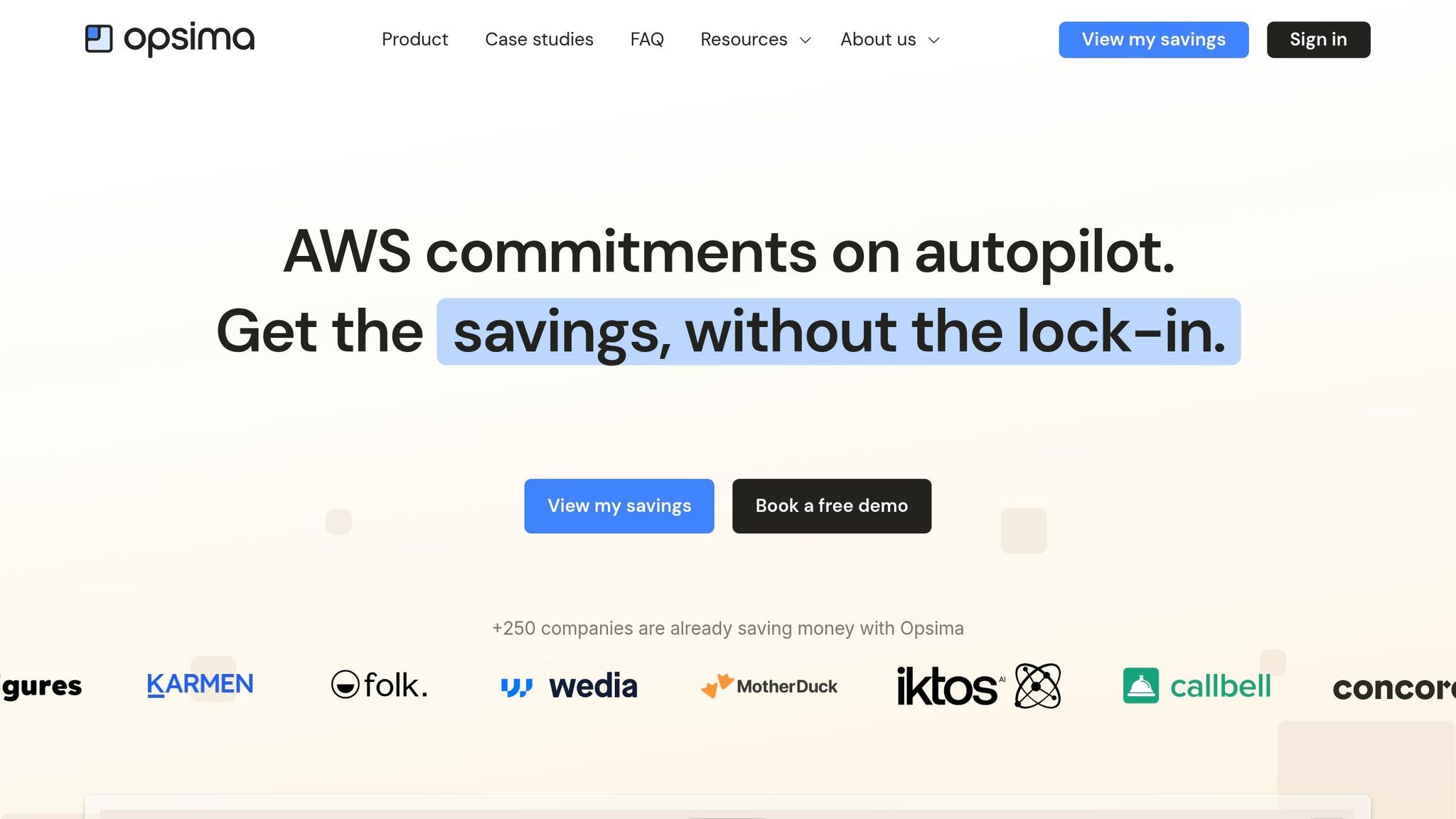
Managing Savings Plans often demands constant monitoring and manual adjustments, which can be time-consuming and complex. Opsima takes the hassle out of this process by automating commitment management, making it easier to optimize your cloud costs.
Automated Commitment Management
Opsima continuously evaluates your usage patterns and automatically fine-tunes your Savings Plans. It achieves this through forecasting, rightsizing, and exchanging commitments to match your changing cloud usage needs. By automating these periodic adjustments, Opsima ensures your Savings Plans stay aligned with your AWS consumption. This allows you to align cloud commitments with real-time usage effectively.
This method zeroes in on rate optimization through commitment management. Opsima supports a wide range of AWS services, including EC2, ECS, Lambda, RDS, ElastiCache, OpenSearch, and SageMaker. On average, this approach can cut your cloud expenses by up to 40%.
Flexibility and Security
Worried about long-term commitments? Opsima tackles this with adaptive laddering, which staggers expiration dates. This strategy creates regular opportunities to reassess and tweak your commitments, helping you avoid the risks of vendor lock-in.
The platform also keeps things flexible by dynamically balancing workloads between Spot and On-Demand instances. For instance, if a Savings Plan is underutilized, Opsima can shift Spot usage to On-Demand, ensuring you fully benefit from your pre-paid commitment. Importantly, Opsima prioritizes security and privacy, never accessing your data or applications. Plus, you only pay a percentage of the savings it delivers. With a quick 15-minute onboarding process and the freedom to cancel anytime, Opsima keeps things simple and user-friendly.
This automated approach is a game-changer for AWS cost management, driving better efficiency and reducing unnecessary spending.
Conclusion
Making the most of AWS Savings Plans requires consistent effort and a clear strategy. Start by reviewing your historical usage to establish a cautious baseline. This baseline should also account for AWS regional pricing variations that impact your overall spend. Then, align your commitments with workloads that show steady, predictable usage. To get the best results, allocate discounts effectively across accounts, stagger purchases to avoid long-term lock-ins, and keep a close eye on usage as your cloud environment changes.
Relying on a "set it and forget it" approach can lead to underutilized capacity or costly On-Demand charges. Since Savings Plans work on an hourly "use it or lose it" basis, regular evaluations are critical to maintaining utilization rates between 98% and 100%.
Managing this manually in a complex, multi-account setup can be daunting. Automated tools like Opsima simplify the process by using forecasting and adaptive strategies to ensure your Savings Plans align with actual usage - without requiring constant manual oversight.
Start cautiously, track your usage, and adjust your commitments as needed. Whether you handle this manually or use automation, the goal is straightforward: consistently achieve the lowest possible effective rate.
FAQs
How do I pick the right Savings Plan type for my workloads?
To select the best AWS Savings Plan for your needs, evaluate your workload patterns:
- EC2 Instance Savings Plans are ideal if your workloads are predictable and stable, especially within specific instance families and regions. These plans offer the deepest discounts.
- Compute Savings Plans are better suited for workloads that require flexibility or vary over time. They cover multiple services and regions.
Take a close look at your usage trends to align your commitment level accurately and steer clear of over-committing or under-committing.
What utilization and coverage targets should I aim for in production?
When managing production workloads on AWS, target 70-80% utilization and 70-80% coverage for predictable workloads under AWS Savings Plans. This approach strikes a balance between cost efficiency and flexibility.
Maintaining a 70-80% utilization rate ensures you’re making the most of your committed spend without the risk of overcommitting. At the same time, 70-80% coverage ensures that the majority of your steady-state workloads take advantage of discounts, helping to lower costs while keeping room for workload adjustments.
How can I avoid overcommitting when my usage changes each quarter?
To stay within budget and avoid overcommitting, prioritize flexibility and keep a close eye on your usage patterns. By analyzing past trends, you can align Savings Plans with your typical demand, reducing the risk of paying for unused capacity. Compute Savings Plans are particularly helpful because they adjust to changing workloads. Regularly reviewing and tweaking your commitments ensures you avoid unnecessary costs. Tools like Opsima can automate this process, helping you optimize commitments and only pay for what you actually use, even as your usage fluctuates.