1-Year vs 3-Year AWS Commitments: Key Differences

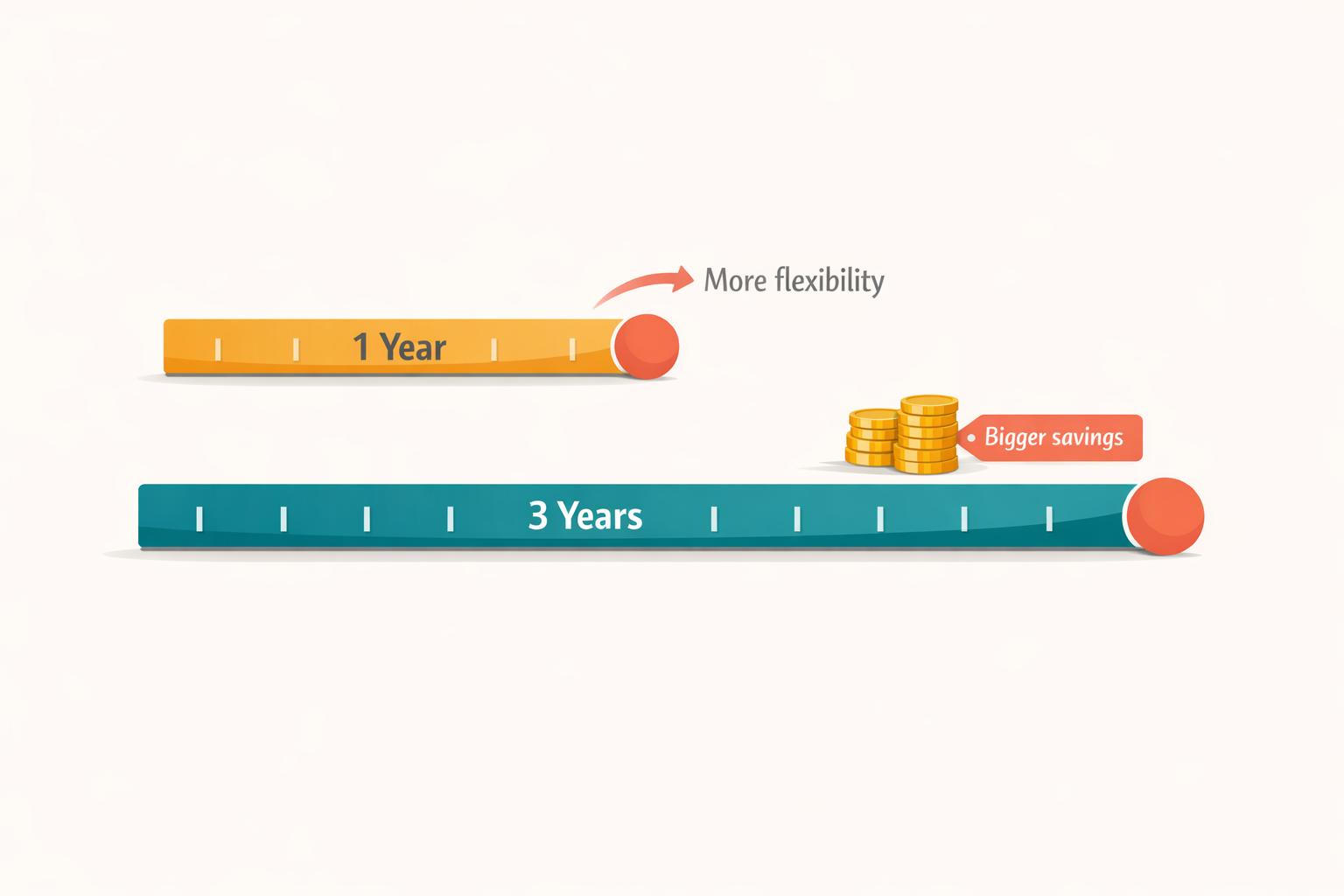
AWS offers 1-year and 3-year commitment options through Savings Plans and Reserved Instances to help you lower cloud costs. The choice between these terms depends on your need for flexibility versus cost savings. Here's the breakdown:
-
1-Year Commitments:
- Discounts range from 30% to 50%.
- Ideal for evolving or unpredictable workloads.
- Allows for annual adjustments to match changing needs.
-
3-Year Commitments:
- Savings can go up to 72%.
- Suited for stable, predictable workloads.
- Requires accurate long-term forecasting and locks you in for 36 months.
Key Payment Options:
- All Upfront: Highest savings but requires full payment at the start.
- Partial Upfront: Splits payment between upfront and monthly charges.
- No Upfront: Lower savings but spreads costs over time, preserving cash flow.
Risks:
- Long-term commitments increase the chance of underutilization.
- Usage drift (changing workloads or regions) can lead to wasted costs, especially with 3-year terms.
Strategies:
- Combine 3-year plans for stable workloads and 1-year plans for dynamic ones.
- Use staggered purchases to adjust commitments quarterly.
Quick Comparison:
| Aspect | 1-Year Commitment | 3-Year Commitment |
|---|---|---|
| Savings | Up to 50% | Up to 72% |
| Flexibility | Higher | Lower |
| Best For | Dynamic workloads | Stable workloads |
| Risk of Underuse | Lower | Higher |
| Payment Options | All, Partial, No Upfront | All, Partial, No Upfront |
Choosing the right term depends on your workload stability, budget, and long-term plans. A layered approach - mixing 1-year and 3-year terms - can help balance savings and flexibility.
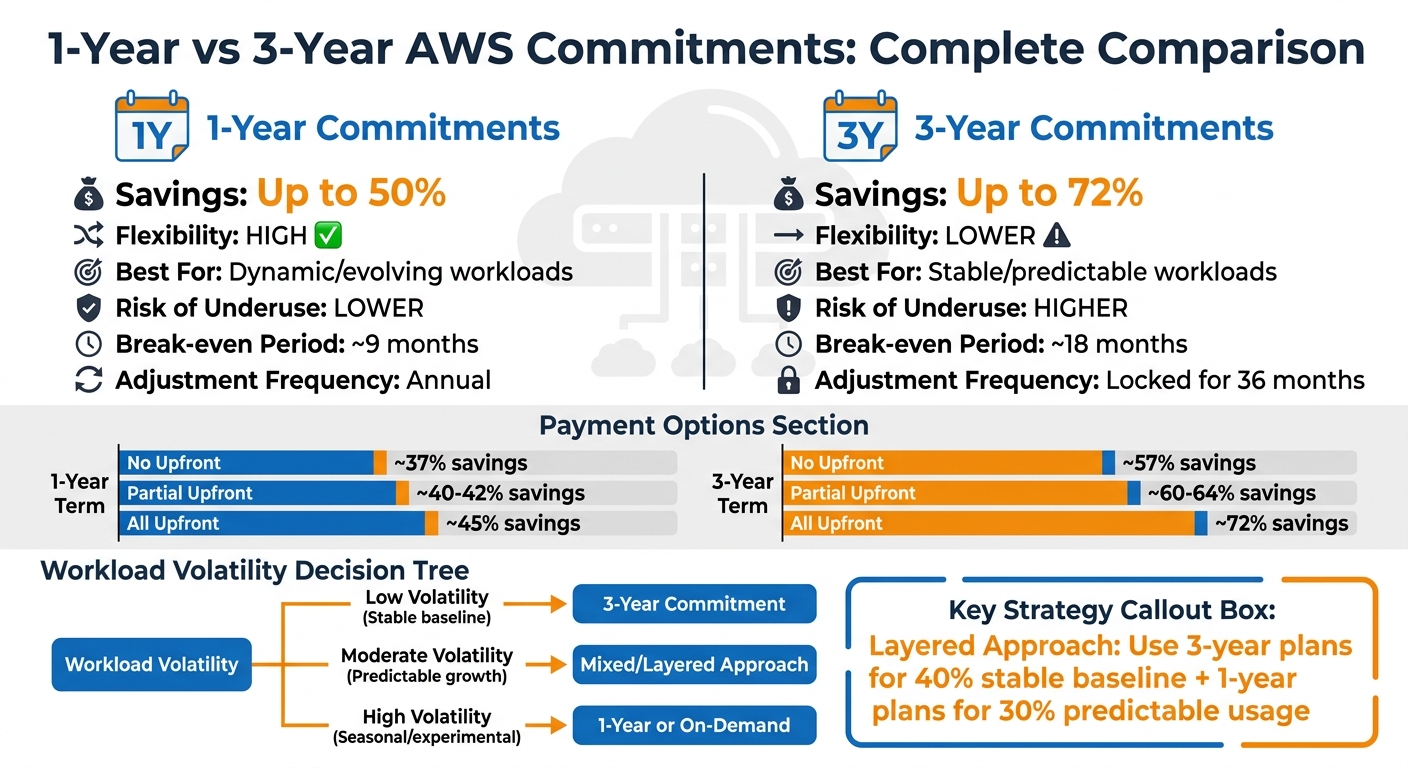
AWS 1-Year vs 3-Year Commitment Comparison: Savings, Flexibility and Risk
Savings Plans and Reserved Instances - What purchase strategy is right for you? | AWS Events
Cost Savings Comparison
Committing to longer terms with AWS Savings Plans can lead to significant cost reductions. Opting for a 1-year term can cut costs by 30–50% compared to On-Demand pricing, depending on the payment plan. For those willing to commit to a 3-year term, the savings can soar up to 72% for EC2 Instance Savings Plans.
"If your organization runs workloads on AWS... without commitment-based discounts, you're likely overpaying by 30–72% on compute alone." – CloudCostCutter
Your choice of payment structure also plays a major role in determining the discount rate. Choosing All Upfront payments provides the highest savings, while No Upfront options offer smaller discounts but help maintain cash flow. For instance, a 1-year No Upfront plan saves about 37%, whereas a 1-year All Upfront plan increases savings to roughly 45%.
The type of Savings Plan you select also matters. EC2 Instance Savings Plans deliver the highest discounts - up to 72% - but they lock you into a specific instance family and region. On the other hand, Compute Savings Plans offer more flexibility, allowing you to switch between instance types, regions, and even services like Lambda and Fargate, though the savings max out at 66%. Over time, this difference can add up. For example, on a $50,000 monthly compute bill, the 6% gap translates to $3,000 per month, or $108,000 over three years.
Savings Rate Comparison Table
| Term Length | Payment Option | On-Demand Price/Hour | Commitment Price/Hour | Savings Percentage |
|---|---|---|---|---|
| 1-Year | No Upfront | $0.096 | ~$0.061 | ~37% |
| 1-Year | All Upfront | $0.096 | ~$0.053 | ~45% |
| 3-Year | No Upfront | $0.096 | ~$0.041 | ~57% |
| 3-Year | All Upfront | $0.096 | ~$0.027 | ~72% |
Example based on an m5.large instance (Linux, us-east-1 region)
Flexibility Differences
A 1-year term gives you the chance to adjust your commitments annually, while a 3-year term locks you into a 36-month agreement. With a 1-year plan, you can reassess your needs each year. In contrast, a 3-year term requires sticking to a specific hourly spend for the entire duration, with no option to scale down or exit early.
If you’re experimenting with different architectures, transitioning from EC2 to serverless, or unsure about your infrastructure needs beyond the next year, the 1-year option offers more breathing room. It only requires forecasting for 12 months instead of planning for three years. As Prashansa Joshi, an AWS Community Builder and DevOps Engineer, notes:
"1-year plans are more flexible for teams with evolving workloads".
One smart way to use 1-year plans is by staggering several smaller commitments throughout the year, rather than making one large annual purchase. This approach allows you to adjust your commitments every few months. For example, if circumstances change, you could reduce your total commitment by about 25% each quarter as individual plans expire. Achieving this kind of quarterly flexibility with 3-year terms would require juggling 12 overlapping plans, which adds a lot of complexity.
Workload Volatility Considerations
The volatility of your workload plays a key role in deciding between these terms. Volatility refers to how much your usage fluctuates over time. If your compute needs vary by more than 10–15%, that’s generally considered medium to high volatility.
For workloads that are stable and predictable - like production databases running 24/7 or legacy systems with steady traffic - a 3-year commitment makes sense. You can confidently estimate your usage and take advantage of higher discounts, which can go up to 72%. On the other hand, if your workloads are dynamic or unpredictable - such as development environments, seasonal apps, or startups testing new ideas - a 1-year term is usually a safer choice. Juliana Costa Yereb, Senior FinOps Specialist at ProsperOps, advises caution:
"Locking into long-term commitments may offer savings but could limit agility if your architecture evolves".
A layered approach can help you strike the right balance. Use 3-year plans for stable, predictable workloads, and 1-year plans for areas where usage fluctuates. This way, you can maximize savings on steady workloads while keeping the flexibility to adapt where needed. These choices directly influence both cost savings and risk levels when managing AWS commitments.
Risk Factors and Mitigation
One of the biggest risks with long-term commitments is underutilization - when your actual usage falls below the committed levels. In these cases, you're stuck paying the full hourly cost, even if you're not using the resources. This risk becomes even more significant with 3-year commitments since the longer time frame increases the chance of usage changes. For example, to break even on a 3-year plan with a 50% discount, you'll need consistent usage for at least 18 months. In contrast, a 1-year plan with a 30% discount requires only 9 months of steady usage to break even.
Another challenge, especially with 3-year terms, is usage drift. If your needs change - like switching instance families or moving to a different region - your commitments may no longer align with your actual usage. This mismatch can lead to unnecessary costs.
Strategies to Reduce Risk
A layered commitment approach can help you manage these risks effectively. Here's how it works:
- 3-year commitments: Reserve these for your most stable workloads, which form the "stable floor" of your usage - around 40% of your baseline. These workloads are unlikely to change over time, making them ideal for maximizing savings.
- 1-year commitments: Apply these to the next 30% of your predictable usage. This gives you more flexibility while still taking advantage of discounts.
Another way to maintain flexibility is through staggered purchasing. Instead of locking into a single large commitment each year, spread out your purchases by buying smaller plans quarterly. This approach creates natural exit points. If your business needs shift, you can adjust your total commitment by up to 25% as each quarterly plan expires. Plus, it avoids the complexity of managing overlapping 3-year terms.
Risk Comparison Table
| Volatility Level | Preferred Term | Rationale |
|---|---|---|
| Low (Stable Baseline) | 3-Year Commitment | Maximize savings (up to 72%) for the "stable floor" of usage that is guaranteed to run for at least 18 months. |
| Moderate (Predictable Growth) | Mixed / Layered | Combine 3-year terms for the core baseline with 1-year terms for predictable growth to balance savings and flexibility. |
| High (Seasonal/Experimental) | 1-Year or On-Demand | Avoid long-term lock-in. Use 1-year terms for re-evaluating annually, and On-Demand pricing to handle unpredictable spikes or experimental needs. |
Payment Options and Their Impact
When it comes to AWS cost management, there are three payment options to choose from: All Upfront, Partial Upfront, and No Upfront. These options are available for both 1-year and 3-year commitments, each offering varying levels of discounts depending on the term length.
Here’s how they break down:
- All Upfront: You pay the full amount at the start, which unlocks the highest discounts - approximately 48% for 1-year plans and 66% for 3-year Compute Savings Plans.
- Partial Upfront: This splits the cost, with about 50% paid upfront and the rest billed as a discounted hourly rate over the term.
- No Upfront: There’s no upfront payment. Instead, the total cost is spread across hourly charges, offering savings of around 40% for 1-year plans and 64% for 3-year plans.
The difference in savings between these options is worth noting. For 1-year commitments, there’s an 8% gap between No Upfront and All Upfront, while for 3-year plans, the gap narrows to just 2%. From a financial perspective, the internal rate of return for choosing All Upfront over No Upfront on a 1-year plan is estimated at 3.7%.
"All Upfront: best ROI if you have the cash. No Upfront: choose if cash flow is constrained."
- Alex Thompson, CEO & Cloud Architecture Expert, ZeonEdge
For startups or businesses with tight cash flow, No Upfront is generally the best choice as it preserves liquidity. On the other hand, organizations with available funds can benefit more from All Upfront, as it maximizes savings and simplifies payment processes.
One notable exception is the Database Savings Plans, introduced in December 2024, which only support the No Upfront option.
Next, let’s explore how automated commitment management can simplify these payment decisions.
Automating Commitment Management with Opsima
When it comes to managing commitments on AWS, the manual process can feel like a juggling act - especially when deciding between 1-year and 3-year terms. This is where Opsima steps in, automating the entire process to help you save time, reduce risks, and cut costs. By continuously optimizing Savings Plans and Reserved Instances, Opsima ensures you’re always paying the lowest possible rate without having to tweak your infrastructure.
One of Opsima’s standout features is its ability to dynamically manage commitments across key AWS services like EC2, ECS, Lambda, RDS, ElastiCache, OpenSearch, and SageMaker. It tackles the "use it or lose it" problem head-on, ensuring that unused commitments in any given hour don’t go to waste. What’s more, Opsima operates seamlessly - no changes to your data, applications, or infrastructure are required. The onboarding process takes just 15 minutes, and its intelligent commitment layering can slash cloud costs by up to 40%. For example, it uses higher-discount EC2 Instance Savings Plans for stable workloads and flexible Compute Savings Plans for more variable environments.
Opsima also simplifies the often tricky task of aligning commitments with your actual usage. Instead of aiming for peak usage, experts recommend targeting 70-80% of baseline usage to strike the right balance. Opsima takes the guesswork out of this process by continuously monitoring utilization and coverage. It adjusts commitments as needed, helping you maintain flexibility while still reaping the discount benefits of both shorter and longer-term plans.
Choosing the Right Commitment Term
When deciding between 1-year and 3-year AWS commitments, it’s all about finding the right balance between savings and adaptability. The choice depends heavily on your business's needs, growth pace, and workload stability.
If your architecture is still evolving or your business is growing quickly, 1-year commitments are the safer option. They provide moderate discounts - usually around 35-40% for EC2 Instance Savings Plans - while giving you the flexibility to reassess your needs annually. On the other hand, 3-year commitments offer the maximum savings, with discounts reaching up to 72% for EC2 Instance Savings Plans. However, they lock you in for a longer term, making them a better fit for stable and predictable workloads.
To help make this decision, consider breakeven analysis. For instance, a 1-year plan offering a 30% discount will break even after about 9 months of usage. Meanwhile, a 3-year plan with a 50% discount takes roughly 18 months to reach breakeven. This means 3-year terms require greater confidence in your long-term usage patterns and a longer commitment before seeing a return on your investment.
A smart approach is to adopt a layered strategy. For your stable, consistent workloads, secure 3-year commitments. For more variable workloads, stick to 1-year plans. You can also implement rolling renewals by staggering quarterly purchases. This method allows you to adjust approximately 25% of your commitment every three months, giving you greater flexibility.
Another crucial factor to evaluate is your workload volatility. If you're transitioning from EC2 to containers or serverless architectures, or if your company is growing rapidly (over 30% annually), shorter 1-year terms are the better choice to avoid being stuck with outdated infrastructure. For well-established production systems with predictable resource needs, 3-year commitments can deliver better financial results. Experts suggest committing to 70-80% of your baseline usage, rather than your peak, to avoid paying for excess capacity during slower periods.
To simplify this process, tools like Opsima can analyze your usage patterns and automatically adjust your commitment mix. Opsima’s automation ensures your commitments remain optimized as your needs evolve, making it easier to manage these strategies effectively.
FAQs
How do I estimate my baseline usage before committing?
To get a clear picture of your baseline usage for AWS Savings Plans, start by examining your current and historical usage patterns over a meaningful timeframe - such as the last month or quarter. Tools like AWS Cost Explorer and the AWS Pricing Calculator are incredibly helpful for pinpointing your average hourly or monthly usage. It's also important to factor in trends, like seasonal fluctuations or growth projections, to ensure your commitment matches your actual needs. This approach helps you steer clear of over-committing or leaving resources underutilized.
What happens if my usage shifts to a new region or instance family?
When your usage shifts to a different region or instance family, the effect largely depends on your AWS commitment type. Reserved Instances are locked to specific regions and instance families, meaning you might lose discounts if you make changes - unless you're using convertible Reserved Instances, which allow for some flexibility but within certain limits. On the other hand, Savings Plans, particularly Compute Savings Plans, offer much more flexibility. These discounts can adapt across regions and instance families, as long as they fall within the same compute category.
How much should I commit (percent of usage) to avoid underutilization?
To avoid underutilization, consider committing around 70-80% of your predictable usage. Committing too close to 100% can lead to waste if your usage decreases, while committing too little could mean missing out on potential savings. Using strategies like rolling Savings Plans or staggered commitments can provide more flexibility, letting you adjust as your usage evolves. These methods help you lock in discounts while minimizing the risk of overcommitting.