Common AWS Commitment Mistakes and How to Fix Them


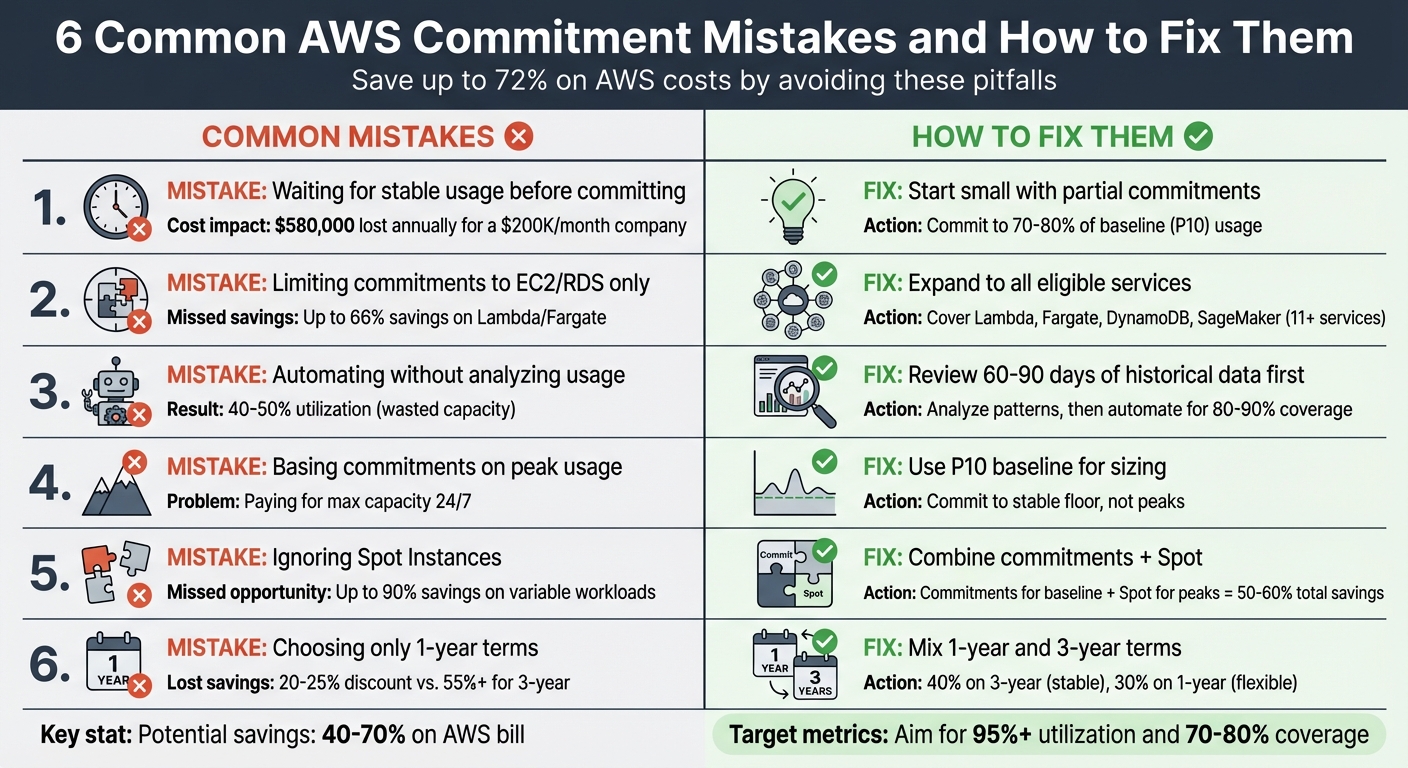
AWS Savings Plans and Reserved Instances can cut cloud costs by up to 72%, but many companies lose money due to common mistakes. Missteps like overcommitting, delaying decisions, or focusing only on EC2/RDS can lead to wasted resources. Here's a quick overview of what to avoid and how to fix it:
-
Mistake 1: Waiting for stable usage before committing.
Fix: Start small by committing to 70–80% of your baseline usage. -
Mistake 2: Limiting commitments to EC2/RDS.
Fix: Expand to cover services like Lambda, Fargate, and DynamoDB. -
Mistake 3: Automating commitments without analyzing usage.
Fix: Use 90 days of data to identify consistent patterns before automating. -
Mistake 4: Basing commitments on peak usage.
Fix: Commit based on your stable baseline (P10 usage level). -
Mistake 5: Ignoring Spot Instances.
Fix: Combine Savings Plans for steady workloads with Spot Instances for peaks. -
Mistake 6: Choosing only 1-year terms.
Fix: Mix 1-year and 3-year terms for long-term savings and flexibility.
AWS tools like Cost Explorer or third-party solutions like Opsima can help monitor and adjust commitments, ensuring high utilization and cost efficiency. Avoid these pitfalls, and you could save 40–70% on your AWS bill.
6 Common AWS Commitment Mistakes and How to Fix Them
The AWS Savings Plan Trap Is Stealing Your Money
Mistake 1: Delaying Commitments Until Usage Stabilizes
One common misstep teams make is postponing Savings Plans commitments while waiting for their cloud usage to stabilize. The reality? Cloud usage is always in flux. Applications scale up or down, architectures shift, and business needs evolve. Holding out for the "perfect moment" often leads to paying full on-demand rates indefinitely.
For example, if a company spends $200,000 per month on cloud services, delaying commitments can cost them around $48,400 each month - adding up to over $580,000 in a year.
"Most companies respond to this risk [of overcommitment] by staying on-demand, effectively paying a 50% 'flexibility tax' every month. They know they're overpaying, but the fear of overcommitment paralysis keeps them from acting." – Usage AI
The good news? You don’t have to wait for perfect data. Choosing between Reserved Instances and Savings Plans is easier when you realize AWS Savings Plans are flexible, operating on an hourly "use it or lose it" basis. Any usage exceeding your commitment simply defaults to standard on-demand rates. By starting small and committing to your baseline usage, you can begin saving immediately while minimizing risk.
Solution: Start with Partial Commitments
A practical first step is committing to your absolute baseline usage, which can be identified by analyzing the last 90 days of data and using the P10 value - your lowest consistent usage level.
To stay on the safe side, commit to 70–80% of that baseline. For instance, if your P10 usage is $100 per hour, start with a commitment of $70–80 per hour. This buffer ensures your commitment is fully utilized while leaving room for unexpected dips.
Here’s why this approach works:
- 1-Year "No Upfront" Compute Savings Plans: These plans offer 40–43% savings and adapt automatically across services, regions, and instance families - no upfront payment required. If your architecture changes (e.g., migrating to Graviton processors or containers), the commitment adjusts to fit.
- Built-in Flexibility: AWS allows a 7-day return window for Savings Plans with hourly commitments of $100 or less. Plus, the break-even point for a Compute Savings Plan with a 29% discount is typically around 8.5 months. Even if you need to pivot later, you'll still save money compared to staying on-demand.
For added efficiency, tools like Opsima can automate this process. Opsima continuously tracks your AWS usage and adjusts your commitment levels dynamically, ensuring you’re always aligned with your evolving baseline while capturing maximum savings.
Mistake 2: Limiting Commitments to EC2 and RDS Only
When starting with partial commitments, it’s important to think beyond just EC2 and RDS. Focusing solely on these two services means missing out on significant savings opportunities across other AWS offerings.
For example, Compute Savings Plans can provide up to 66% savings on services like AWS Lambda and Fargate. If your architecture includes serverless functions or containerized workloads, sticking to on-demand rates could be costing you more than necessary.
The same applies to databases. Database Savings Plans offer flexible discounts for 11 services, including DynamoDB, ElastiCache, and DocumentDB. These plans can save up to 35% for serverless databases and 20% for provisioned instances. However, many organizations still rely solely on RDS optimization through Reserved Instances, which limits their flexibility as database needs evolve.
Modern cloud architectures often rely on a wide range of services. For instance, machine learning workloads running on SageMaker can benefit from SageMaker AI Savings Plans, which deliver up to 64% savings across notebooks, training, and inference. Additionally, ignoring high-cost services like OpenSearch in your commitment strategy could leave you stuck paying full on-demand rates.
Solution: Expand Commitments Across All Eligible Services
To maximize savings, start by reviewing AWS Cost Explorer to identify consistent on-demand spending across services like Lambda, Fargate, and DynamoDB.
- Compute Savings Plans: These plans offer cross-service flexibility and cover EC2, Fargate, and Lambda with up to 66% discounts. While EC2-only plans might have slightly higher discounts, the flexibility of Compute Savings Plans often makes them the better choice.
- Database Savings Plans: These plans allow you to switch between database types (e.g., migrating from RDS for Oracle to Aurora PostgreSQL) without losing your discount. They only support 1-year terms with no upfront payment, making them a low-risk option for diverse database workloads.
Keep in mind that Lambda request charges ($0.20 per million requests) are not included in these discounts - only the compute duration is covered. Be sure to evaluate your duration-to-request ratio before committing.
For a streamlined approach, tools like Opsima can help automate multi-service coverage. Opsima tracks usage across services like EC2, ECS, Lambda, RDS, ElastiCache, OpenSearch, and SageMaker, dynamically adjusting commitments to ensure you’re always maximizing your savings potential.
Mistake 3: Automating Without Understanding Usage Patterns
Jumping into automation without first analyzing historical usage can lead to overcommitting resources. Companies that automate without first gaining a clear view of their usage often end up with only 40–50% utilization of their reserved capacity. This undermines efforts to optimize AWS costs and can result in wasted resources.
One of the main pitfalls is that automation tools can misread temporary usage spikes as consistent demand. These spikes skew the baseline analysis, causing organizations to commit to more resources than they actually need.
"A commitment purchased based on last year's usage patterns can become a stranded cost if the product or infrastructure evolves unexpectedly."
Because commitments operate on a "use it or lose it" basis, any unused capacity becomes a sunk cost. For example, if you commit to a $100-per-hour plan but only use $60 worth, the remaining $40 is wasted. Without a proper understanding of your usage patterns, you risk committing to fluctuating needs rather than a stable baseline.
Solution: Review Historical Data Before Automating
To avoid these issues, start by analyzing 60–90 days of historical compute usage. This allows you to identify a stable baseline for your resource needs. AWS Cost Explorer is a great tool for this - it provides hourly normalized usage data, helping you calculate the 10th percentile (P10) of your usage. This figure reflects the capacity that consistently runs and is safe to commit to.
The best financial strategy is to commit to a stable, predictable portion of your compute usage while using on-demand or spot pricing for variable workloads. Experts in financial operations suggest aiming for 80–90% coverage of your stable base load. This approach avoids over-commitment while ensuring efficient use of every committed hour.
Once you’ve established a clear baseline, tools like Opsima can take over. Opsima dynamically monitors usage patterns across AWS services like EC2, ECS, Lambda, RDS, ElastiCache, OpenSearch, and SageMaker. It adjusts commitments as your infrastructure evolves, minimizing the risk of over-purchasing and keeping your costs under control. To see how much you could save, you can estimate your savings with a personalized report.
Mistake 4: Basing Commitments on Peak Usage
When you base your commitments on peak usage instead of a steady baseline, you're essentially locking yourself into paying for maximum capacity around the clock - even during times when your actual usage is much lower.
Here’s why this is problematic: AWS commitments like Reserved Instances and Savings Plans come with hourly spend obligations. If you size these commitments for your busiest periods, you’ll be paying for that peak level every single hour, even when your usage dips. Workloads typically aren’t constant - they fluctuate. By tying your financial commitment to a temporary spike, you lose the flexibility that makes cloud computing so valuable and end up paying for unused capacity. This approach can lead to ongoing inefficiencies that stretch your budget unnecessarily.
The financial downside is significant. And it gets worse if you overestimate your future growth. If your usage doesn’t grow as expected, you might find yourself with coverage exceeding 100% of your actual needs - essentially paying for resources that sit idle.
"Commit too much and you waste money on unused capacity. Commit too little and you leave savings on the table." - Nawaz Dhandala, OneUptime
Because these commitments are billed hourly, whether you use them or not, basing them on peak usage often leads to substantial waste.
Solution: Use Average Usage for Commitment Sizing
A better strategy is to focus on your "stable floor" - the minimum capacity that runs consistently, 24/7. This steady baseline is a safer and more cost-effective foundation for your commitments.
To find this stable floor, analyze 30–90 days of hourly spend data and commit to your P10 baseline. This metric reflects the capacity that is consistently used and won’t leave you paying for unused hours. AWS Cost and Usage Reports (CUR), queried through Amazon Athena, can provide detailed insights into your usage patterns.
Instead of committing to 100% of your average or peak usage, aim for 70–80% of your baseline. This leaves a cushion for flexibility while ensuring high utilization. For instance, you could allocate 3-year terms to the most stable 40% of your baseline (to maximize discounts) and 1-year terms to the next 30%, leaving the rest as on-demand to handle any spikes.
Opsima can help by continuously monitoring your usage and adjusting commitments to ensure you’re always paying the lowest possible rate, even as your usage patterns change. This includes accounting for AWS regional pricing variations that can impact your baseline costs. This baseline-focused approach keeps your costs under control while adapting to the evolving needs of your infrastructure.
Mistake 5: Not Combining Spot Instances with Commitments
Many businesses miss out on significant savings by failing to integrate AWS commitments with Spot Instances. Instead, they often stick with Savings Plans and Reserved Instances or experiment with Spot Instances independently. This siloed approach leaves money on the table.
Here’s the challenge: Savings Plans and Reserved Instances don’t apply to Spot Instances. Without a strategic combination, businesses risk either over-committing to handle variable workloads - leading to wasted capacity during lower usage - or avoiding commitments entirely, missing out on discounts ranging from 40% to 72%.
By pairing commitments for your baseline with Spot Instances for variable peaks, you could cut your cloud bill by 50–60%. Spot Instances, which offer discounts of up to 90%, are perfect for fault-tolerant workloads like batch processing, containerized microservices, or development environments. However, they can be interrupted, making them unsuitable for stable, always-on production systems that require commitments.
"Use commitments for baseline, Spot for peaks." – Unanswered.io
The real mistake isn’t choosing one discount model over the other - it’s failing to combine them in a layered way that matches each discount type to the right workload pattern.
Solution: Use Commitments for Baseline, Spot for Peaks
To optimize costs, layer your discount models strategically. Start by using Savings Plans or Reserved Instances for your stable baseline - the capacity that runs around the clock. Then, use Spot Instances to handle demand spikes above that baseline.
As explained in Mistake 4, calculate your stable baseline using the 10th percentile (P10) of hourly usage over 90 days. Commit to covering 70–80% of this baseline to ensure near-full utilization. For workloads beyond this baseline, especially fault-tolerant ones, rely on Spot Instances. Design these workloads to handle interruptions by using checkpointing and Auto Scaling Groups to replace interrupted instances automatically.
| Usage Type | Discount | Best For |
|---|---|---|
| 3-Year Savings Plans | Up to 72% | Most stable baseline capacity |
| 1-Year Savings Plans | Up to 66% | Remaining stable baseline |
| Spot Instances | Up to 90% | Variable, fault-tolerant peaks |
| On-Demand | 0% | Unpredictable or new workloads |
Key Tip: Size your commitments based on your baseline - not the average. Committing to the average usage often results in paying for unused capacity during low-demand periods. Commitments are "use it or lose it", meaning any unused capacity in an hour doesn’t roll over.
Use AWS Cost Explorer to monitor your Savings Plan utilization. Aim for a utilization rate above 95%. If it drops, it might indicate over-commitment. By aligning your commitments with your stable baseline and using Spot Instances for variable demand, you’ll strike the perfect balance between flexibility and cost efficiency as your needs change.
Mistake 6: Defaulting to One-Year Terms Only
Relying solely on one-year terms for AWS Savings Plans is a common misstep. Many organizations opt for one-year terms because they offer more flexibility for workloads that might change quickly. However, this flexibility comes at a price. Discounts for one-year Savings Plans are typically capped around 20–25%, whereas committing to three-year terms can unlock savings of over 55% - more than double the discount.
The downside of three-year terms is that they’re non-transferable and cannot be canceled or modified once purchased. If your business scales down or your architecture shifts to new instance families, you might find yourself stuck paying for capacity you no longer need. That said, avoiding three-year terms altogether means paying a premium for flexibility that you might not even use.
The real problem lies in treating one-year and three-year terms as mutually exclusive. By defaulting to only one-year commitments, you risk missing out on significant savings for workloads that are stable and predictable.
Solution: Mix One-Year and Three-Year Commitments
The key is to create a balanced portfolio. For workloads that are highly stable and run consistently, commit to three-year terms to maximize your savings. For workloads that are still evolving or may undergo architectural changes, stick with one-year terms.
Use a 90-day usage analysis to identify your stable 10th percentile baseline. This baseline helps determine how much capacity should be allocated to three-year versus one-year terms. A good rule of thumb is to allocate around 40% of your stable baseline to three-year commitments for the best discounts. Then, use one-year commitments for the next 30% of predictable usage, giving you flexibility as your infrastructure evolves.
To avoid all your commitments expiring at once, use a layering strategy to spread your purchases over three to six months. Review and adjust your portfolio every three to six months to ensure it aligns with your current workload needs.
Opsima’s approach aligns with this strategy by continuously managing and optimizing your commitment portfolio. As your usage patterns change, Opsima dynamically adjusts your commitments across AWS services. This ensures you’re always paying the lowest effective rate while maintaining the agility your business requires. By blending one-year and three-year terms, your strategy can evolve alongside your workloads, giving you both savings and flexibility.
How to Adjust Commitments as Usage Changes
AWS usage is rarely static. Teams launch new initiatives, traffic patterns evolve, and infrastructure undergoes changes. Yet, despite this dynamic nature, 60% of organizations are expected to encounter major cloud cost overruns by 2027, primarily due to poorly managed infrastructure. One major misstep? Treating commitments as a one-and-done decision rather than an ongoing process.
To stay ahead, you need to continuously monitor and adjust your commitments as usage shifts. Start by revisiting the strategy of analyzing 90 days of historical data to identify your stable floor - the 10th percentile of hourly usage. Keep an eye on two critical metrics: coverage (aim for 70–80%) and utilization (target above 95%). If your current commitments deviate by more than 5% from your baseline, it’s time to make adjustments. However, relying solely on manual tweaks can hold you back.
Here’s why: manual tracking typically results in only 78% utilization and a 34% discount compared to on-demand pricing. In contrast, automated commitment management can dramatically improve these numbers, boosting utilization to 96–98% and achieving effective discounts of up to 52%. That’s the difference between wasting money and making every dollar count.
This is where automated solutions come into play. Tools like Opsima take the guesswork out of the equation. Opsima analyzes your usage patterns across AWS services like EC2, ECS, Lambda, RDS, ElastiCache, Open Search, SageMaker, and more. It dynamically adjusts your Savings Plans and Reserved Instances in real time, ensuring you consistently pay the lowest effective rate. This approach can reduce your cloud spend by as much as 40%. The best part? Opsima operates at the billing layer, meaning it doesn’t access your data or require any changes to your infrastructure. Your workloads remain untouched, but your AWS bill shrinks.
"Commitment optimization is not a one-time project but an ongoing discipline. The organizations that save the most treat their commitment portfolio like a financial asset." – Nawaz Dhandala, OneUptime
Conclusion
Wasting money in the cloud often comes down to a handful of common mistakes: delaying commitments, focusing too much on EC2/RDS, automating too early, over-provisioning for peak usage, overlooking Spot Instances, and defaulting to one-year terms. Among all cost-saving strategies, commitment discounts offer the highest return on investment after right-sizing. When used effectively, Savings Plans and Reserved Instances can slash compute costs by 30% to 70%.
Automated tools can help tackle these challenges by continuously rebalancing commitments, ensuring over 95% utilization and maintaining 70–80% coverage. This approach can cut costs by as much as 40%. For example, Opsima analyzes usage across various AWS services - such as EC2, ECS, Lambda, RDS, ElastiCache, OpenSearch, and SageMaker - and dynamically adjusts Savings Plans and Reserved Instances. This ensures you consistently get the lowest effective rate without requiring infrastructure changes or access to your data.
Optimizing commitments isn’t a one-time task - it’s an ongoing process that separates unnecessary spending from meaningful savings.
FAQs
How do I calculate my AWS baseline (P10) for commitments?
To figure out your AWS baseline (P10) for commitments, focus on analyzing your steady-state usage. The goal is to determine the 10th percentile (P10) of resource consumption over a specific period, such as a month or a year. This number reflects the usage level your workload stays above 90% of the time. Tools like AWS Cost Explorer can help you review historical data, ensuring your commitment decisions are based on actual usage patterns. This approach helps you avoid both overprovisioning and underutilization.
When should I choose a Compute vs Database Savings Plan?
If your infrastructure needs flexibility across instance types, regions, or services like Lambda and Fargate, a Compute Savings Plan is a great choice. This plan is ideal if your usage patterns might change over time and covers EC2, Fargate, and Lambda.
For workloads that are more predictable but still need flexibility across instance generations and database engines, the Database Savings Plan is designed to help you save on database services like Aurora, RDS, and DynamoDB.
How often should I review and adjust my commitments?
Keeping tabs on your AWS commitments is a smart move, especially as workloads evolve. Ideally, you should review these commitments on a monthly or quarterly basis. This practice helps you spot underutilized resources and avoid paying for more than you actually need, ensuring you're not wasting money on over-provisioned services.
To make this process easier, tools like Opsima can handle the heavy lifting. They continuously monitor and optimize your commitments, so you can rest assured you're always getting the lowest effective rates - all without the hassle of manual adjustments.