How AWS Stacks Your Discounts: Commitments vs Negotiated Discounts (EDP, PPA)


In short
- AWS applies your discounts in a fixed order: Reserved Instances, then Savings Plans, then negotiated discounts, then credits.
- Each one works on what the previous one left, so percentages multiply: a 50% Savings Plan and a 10% EDP give you 55% off, not 60%.
- AWS measures what your commitments save you against on-demand prices, and reports negotiated discounts separately.
Introduction
Past a certain size, most AWS bills combine two kinds of discounts:
- Commitments: Reserved Instances and Savings Plans, which you buy for one or three years in exchange for a lower rate on a given usage.
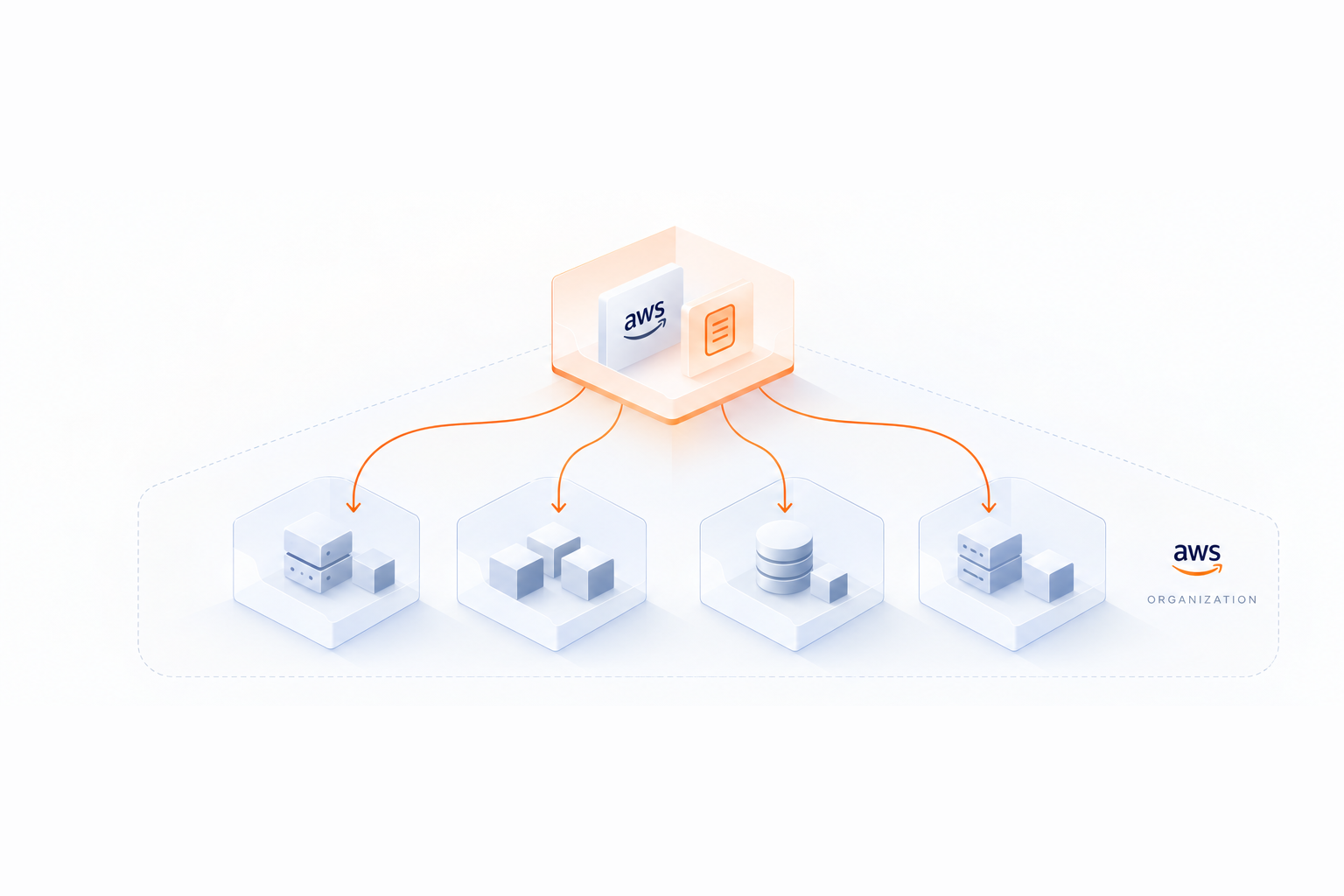
- Negotiated discounts: a percentage off your bill. It comes either from AWS, through an Enterprise Discount Program (EDP), now mostly called a Private Pricing Agreement (PPA), in exchange for a yearly spend commitment, or from a reseller, if you buy AWS through a partner.
So how do they combine? Does your EDP apply on top of your Savings Plans, or do they compete? And which one is behind the savings AWS shows you?
It all comes down to the order in which AWS applies them.
I. The order AWS applies your discounts
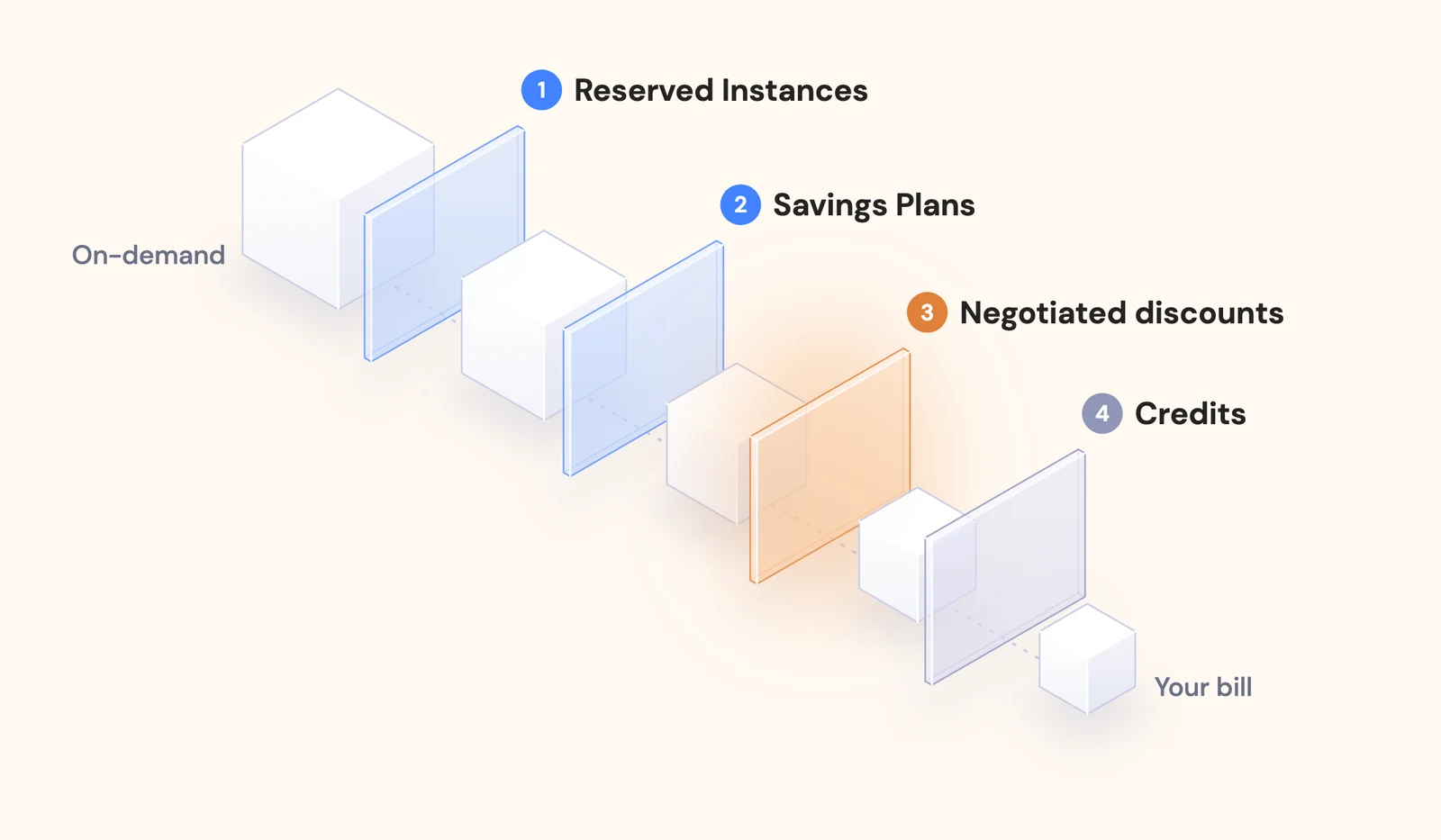
Every hour, AWS goes through your usage in the same sequence, each step working on what the previous one left:
- Reserved Instances cover the usage that matches their attributes (instance family, region, platform, tenancy), which is then billed at the reserved rate.
- Savings Plans cover what Reserved Instances left. EC2 Instance Savings Plans go before Compute Savings Plans, and each plan starts with the usage that gets the highest discount, until its hourly commitment runs out. Within an organization, a plan also serves the account that bought it first, which is why where you buy your commitments matters.
- Negotiated discounts take their percentage off what remains: the on-demand usage no commitment covered and, in most contracts, the commitment fees themselves. A reseller discount works the same way as an EDP, although depending on your contract, the reseller may keep part or all of it.
- Credits come last, on the charges that are left, until they run out.
The first two steps change the price of your usage: an hour of compute costs less once a commitment covers it. The third one takes a percentage off dollars, so your negotiated discount will always apply to a bill your commitments have already reduced.
II. Why your EDP and Savings Plans discounts multiply
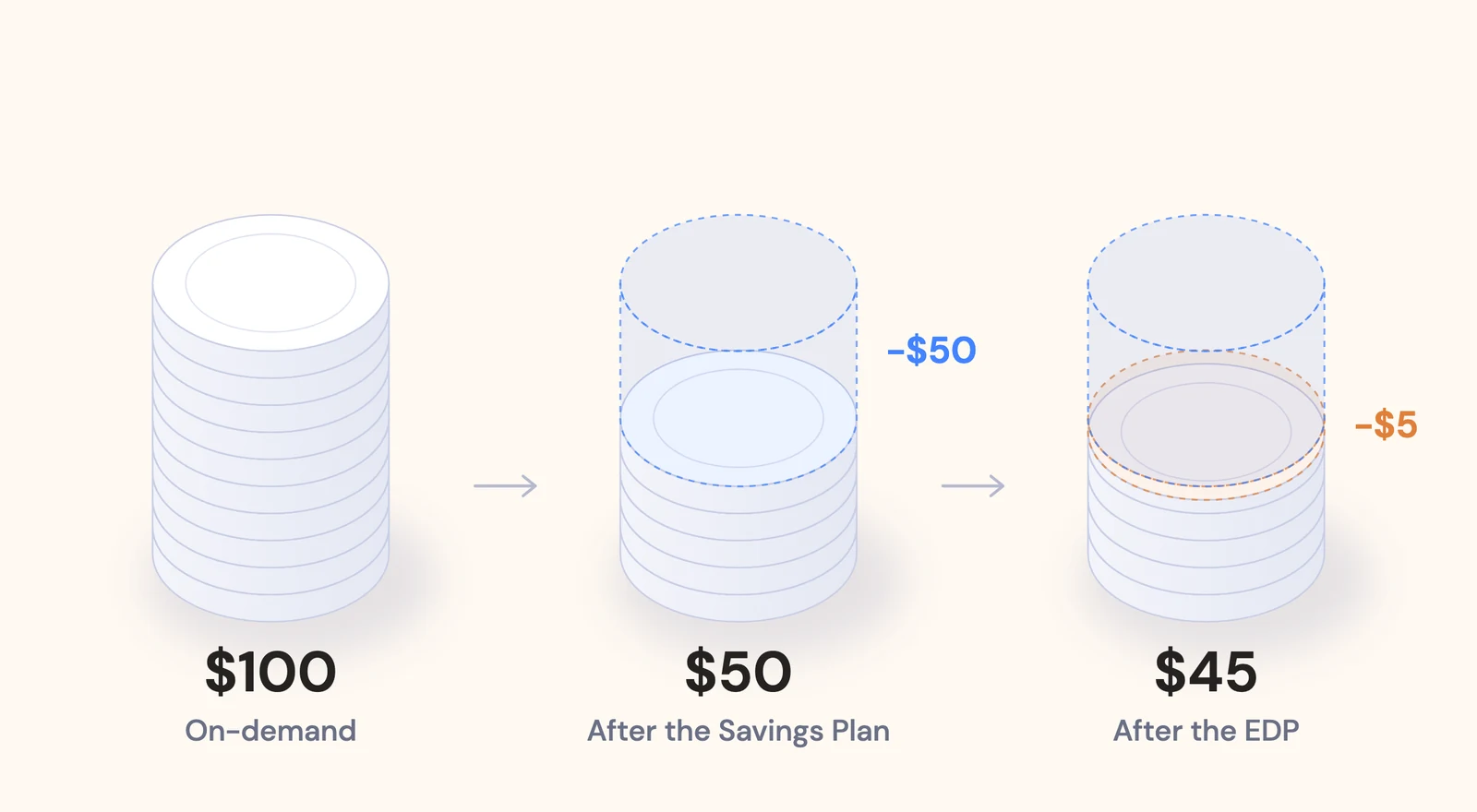
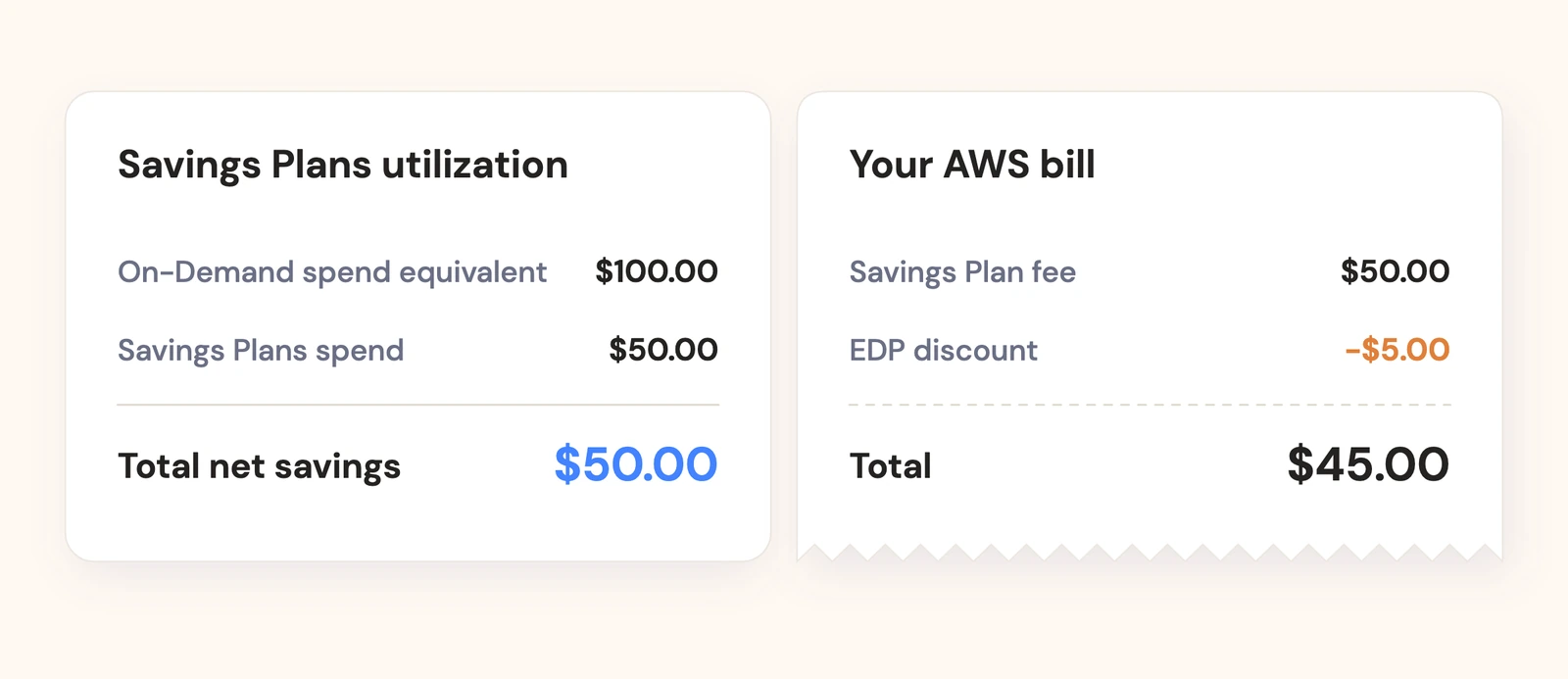
Take $100 of on-demand compute in a month, a Compute Savings Plan giving a 50% discount on that usage, and a 10% EDP:
- The Savings Plan covers the usage, so instead of $100 of on-demand, you pay $50 of Savings Plan fees
- Your EDP takes 10% off those $50, so $5
- You pay $45 in total
That is 55% off, not 60%. Your 10% EDP is worth $5 rather than $10, because it applies to a bill the Savings Plan has already halved.
Two practical consequences:
- Size your EDP on what you will spend after commitments. The more your commitments cover, the smaller the base your EDP applies to, and the less you spend toward your committed amount. If you plan to raise your coverage, base your EDP on the bill you will have afterwards. Our EDP and PPA playbook goes into more detail.
- Commitment fees count as spend. With No Upfront or Partial Upfront plans, the monthly fees are billed like any other usage. They count toward your EDP commitment from the first month, and get your EDP discount if your contract covers them.
III. How AWS measures your commitment savings
When AWS reports what your Savings Plans or Reserved Instances saved you, it compares what you paid for them with what the same usage would have cost at on-demand prices. Negotiated discounts don’t enter that calculation: they are reported on their own.
You can see it in two places:
- The Savings Plans utilization report, in Cost Explorer, shows an “On-Demand spend equivalent”, which AWS describes as what you would have spent on the same usage without Savings Plans, at current On-Demand rates, and “Total net savings”, the difference with your Savings Plans spend. The Reserved Instance utilization report works the same way.
- The Cost and Usage Report gives each usage line covered by a commitment its public on-demand cost, next to its commitment cost. Your EDP or reseller discount is not booked on these lines, but on separate discount lines, on the commitment fees and on the on-demand usage that remains.
Here is the report on a real account:
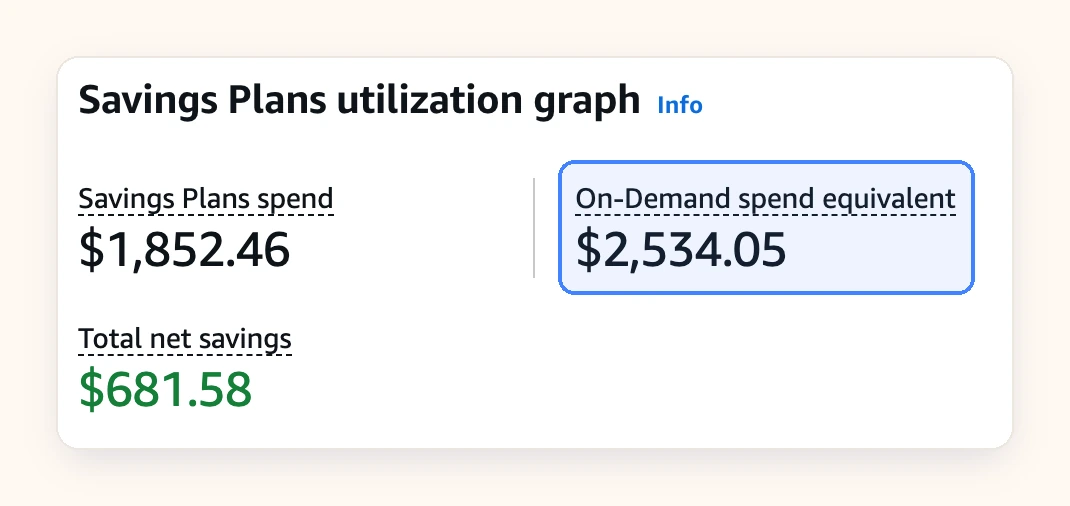
The same usage would have cost $2,534 at on-demand rates. The Savings Plans cost $1,852, so AWS reports $682 of net savings.
In our example, AWS reports $50 of Savings Plan savings, and your bill shows a $5 EDP discount on top. Both are real savings, counted in two different places.
This gives a simple rule when you compare commitment strategies: use the same reference as AWS, the on-demand price. Your negotiated discount takes the same percentage off whatever is left, so it does not change which strategy comes out cheapest, as long as your contract covers commitment fees.
IV. Where to check this on your own bill
- Cost Explorer: switch between “Unblended costs” and “Net unblended costs”, the difference is your negotiated discount. Group by “Charge type” to see each discount on its own line.
- Savings Plans and Reserved Instance utilization reports: what your commitments saved you, measured against on-demand prices. You can open the Savings Plans utilization report in your console, where you will also see your utilization rate, which you want to keep close to 100%.
In the Cost and Usage Report, the line item type tells you which step a line belongs to:
- Usage: on-demand
- DiscountedUsage: covered by a Reserved Instance
- SavingsPlanCoveredUsage: covered by a Savings Plan
- EdpDiscount, PrivateRateDiscount: your EDP or PPA
- SppDiscount, DistributorDiscount: a reseller discount
- Credit: your credits
FAQ
Does an EDP apply on top of Savings Plans?
Yes. AWS applies your Savings Plans first, then your EDP takes its percentage off what is left, including the Savings Plan fees in most contracts. A 50% Savings Plan and a 10% EDP give you 55% off.
Do EDP and PPA discounts apply to Reserved Instance fees?
In most agreements, yes: Reserved Instance and Savings Plan fees are eligible spend like any other. Some agreements exclude a commitment type, so check the exclusions list in yours.
How does AWS calculate Savings Plans savings?
Against on-demand prices. The utilization report subtracts your Savings Plans spend from the On-Demand spend equivalent of the same usage. Your EDP or PPA is not part of that calculation.
Do Savings Plans count toward an EDP commitment?
Yes. Savings Plan fees are AWS spend like any other, so they count toward your committed amount as they are billed.
Does a reseller discount stack with Savings Plans?
Yes, the same way as an EDP: it applies after Reserved Instances and Savings Plans, on what they leave. Depending on your contract, the reseller may pass on all, part or none of it.
Conclusion
- AWS stacks your discounts in a fixed order: Reserved Instances, Savings Plans, negotiated discounts, then credits.
- Each step works on what the previous one left, so percentages multiply, and the more your commitments cover, the less there is left for your EDP to discount.
- AWS measures commitment savings against on-demand prices and reports negotiated discounts separately. Using the same reference when you plan your commitments keeps your numbers consistent with AWS’s own reports.
At Opsima, we manage commitments for companies with or without an EDP or a reseller. If you want to see what a commitment strategy would do to your bill, we can run a simulation on your own data.