Cloud Cost Governance: Best Practices


Cloud cost governance ensures your AWS spending aligns with business goals. It involves clear policies, cost visibility, accountability, and automation to prevent waste and manage resources effectively. Without proper governance, organizations risk overspending and missed savings opportunities.
Key takeaways:
- Visibility: Use tools like AWS Cost Explorer and AWS Budgets to monitor spending trends and detect anomalies.
- Tagging: Implement tagging standards to track costs by team, project, or application.
- Accountability: Assign cost ownership and use chargeback or showback models to encourage optimization.
- Commitments: Balance flexibility and savings with AWS Savings Plans or Reserved Instances.
- Automation: Leverage tools like Opsima to optimize savings and reduce manual effort.
- Policies: Set clear rules for resource provisioning, budgeting, and lifecycle management.
- Collaboration: Establish cross-functional teams (e.g., Cloud Center of Excellence) to align IT, finance, and business goals.
Building Cloud Cost Governance That Lasts | The Keys to AWS Optimization | S14 E10
Building Visibility and Transparency in AWS Costs
Managing AWS costs without clear insight is like navigating in the dark. To make informed decisions about resource allocation and spending, organizations need real-time visibility into their AWS usage across services, teams, and projects. Here's a breakdown of the tools and practices that can help achieve this clarity.
Using Real-Time Cost Analytics
AWS Cost Explorer is your go-to tool for analyzing spending. It provides up to 13 months of historical data and forecasts for the next 18 months. You can filter data by service, region, or instance type to uncover specific spending trends.
For proactive monitoring, AWS Budgets lets you set custom thresholds and sends alerts when spending exceeds those limits. Meanwhile, AWS Cost Anomaly Detection uses machine learning to identify unusual spending patterns. All this data is centralized on the Billing and Cost Management Home Page, which offers customizable widgets to track cost summaries, trends, and allocation coverage.
Cost data updates every 24 hours, and for deeper analysis, you can export it to tools like Amazon Athena or Amazon QuickSight. While the Cost Explorer interface is free to use, API requests come with a small charge of $0.01 per paginated call.
Creating Resource Tagging Standards
Tags act as metadata for organizing and tracking costs by team, application, or cost center. A solid tagging strategy typically includes four categories:
- Technical: Tags like
NameorEnvironmentfor identification. - Automation: Tags for scheduling or backup rules.
- Business: Ownership details such as
CostCenterorProject. - Security: Tags for data classification.
"The key to achieving this granular visibility is the implementation and enforcement of a comprehensive organizational tagging strategy." – AWS Cloud Financial Management
Defining tags isn't enough; enforcement is critical. Tools like AWS Organizations Tag Policies ensure tag values are standardized across your organization. Additionally, Service Control Policies (SCPs) can block resource creation if required tags are missing. To clean up or modify tags in bulk, use the AWS Resource Groups Tag Editor.
Keep in mind that tagging isn't retroactive. Costs are only allocated to tags from the moment they're applied and activated. Once tags are in place, you need to manually enable them as "Cost Allocation Tags" in your billing console. These tags can take up to 24 hours to appear in reports.
Assigning Accountability and Ownership
Once you've established clear visibility into costs, the next step is assigning ownership to ensure those insights lead to effective financial control. Without clear accountability, AWS costs can spiral out of control as teams assume someone else is keeping an eye on spending. AWS highlights the absence of cost optimization ownership as a High risk for organizations.
The best way to tackle this is by creating a centralized group, such as a Cloud Center of Excellence (CCoE), Cloud Business Office (CBO), or FinOps team. This team should include members from finance, technology, and business units who are familiar with both cloud architecture and organizational budgets. To make this effort successful, securing executive sponsorship is critical. This ensures cost optimization remains a priority even when teams are busy with other tasks.
"You must secure executive sponsorship for this function, which is a key success factor. The sponsor is regarded as a champion for cost efficient cloud consumption." – AWS Well-Architected Framework
Organizations typically choose one of three ownership models:
- Centralized: A dedicated team oversees best practices across the company.
- Decentralized: Individual tech teams handle their own cost optimization.
- Hybrid: Central governance is combined with execution at the team level.
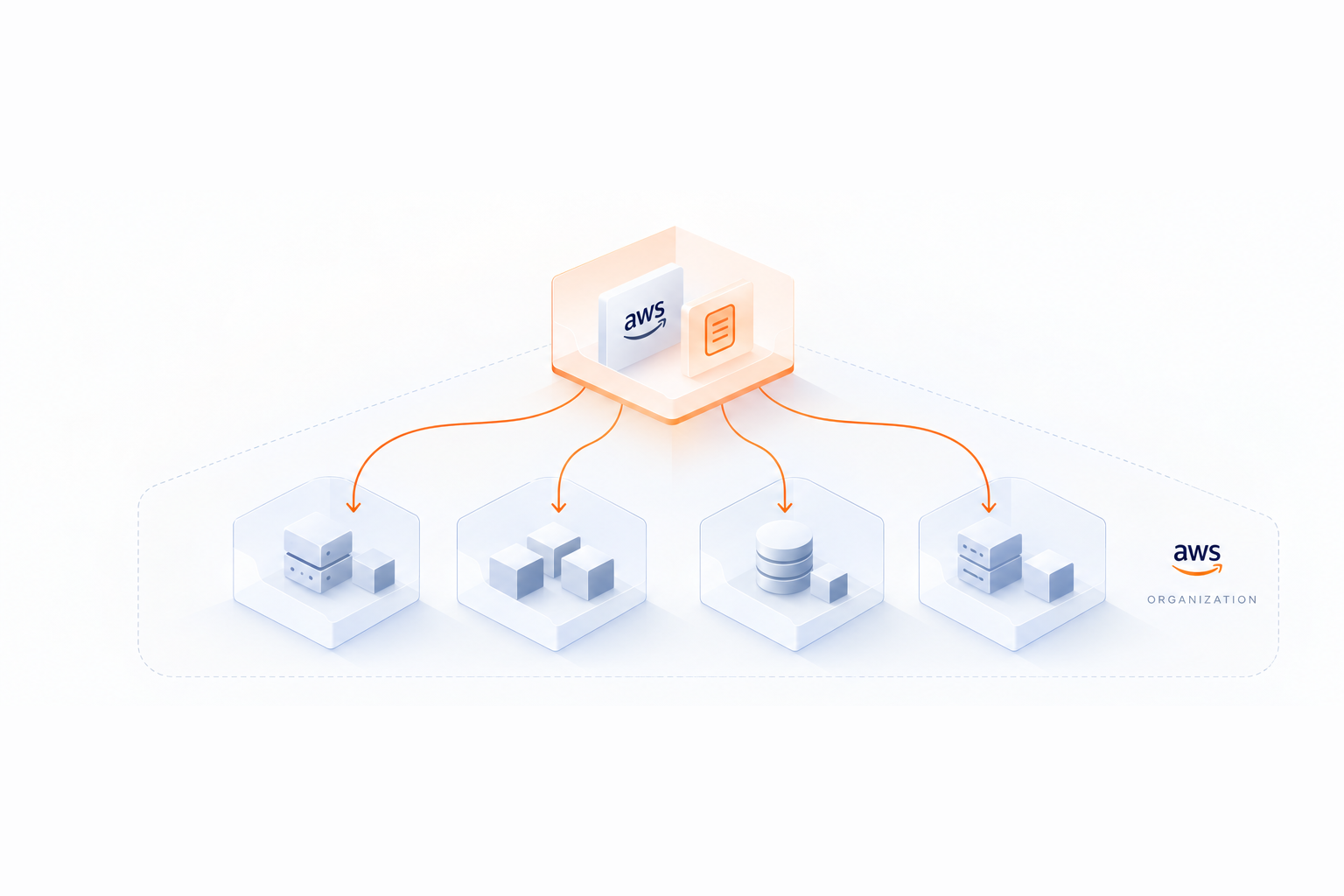
Whichever model you select, AWS Organizations can help structure accountability. Use the management account strictly for billing and governance - never for resource creation. Organize workloads into member accounts grouped by Organizational Units (OUs) like department, environment, or project. This setup ensures every dollar spent is tied to a specific team or workload.
Designating Cost Owners and Roles
To manage and monitor AWS costs effectively, assign cost owners with expertise in areas like financial analysis, resource provisioning, and automation. While some team members will focus entirely on cost management, others - such as application owners or DevOps engineers - can contribute during periodic reviews.
Each workload or business unit should have a designated cost owner or team. Use tools like AWS Budgets and Cost Anomaly Detection to notify these owners when spending exceeds predefined thresholds or when unusual patterns are detected. Additionally, make cost-awareness training a standard part of onboarding for new team members, so everyone understands resource management expectations from day one.
"The capability to attribute resource costs to the workloads, individual organization, or product owners drives efficient usage behaviour and helps reduce waste." – AWS Well-Architected Framework
Once roles are clearly defined, implementing chargeback or showback models can further strengthen accountability.
Implementing Chargeback and Showback Models
Showback and chargeback are two effective approaches for increasing cost accountability:
- Showback: Provides visibility into cloud consumption without financial transactions. It relies on transparency to encourage teams to optimize their usage.
- Chargeback: Allocates cloud costs directly to individual departments, impacting their budgets and creating stronger financial accountability. While effective, it involves higher complexity due to the need for finance integration.
| Feature | Showback | Chargeback |
|---|---|---|
| Primary Goal | Awareness and visibility | Financial accountability |
| Financial Impact | None (informational only) | Direct budget adjustments |
| Complexity | Lower | Higher |
| Behavioral Driver | Peer pressure/transparency | Budget responsibility |
Both models depend heavily on accurate tagging - such as using tags like CostCenter, Team, or Project - and consolidated billing to properly attribute costs. This is especially important considering that by 2025, 21% of enterprise cloud infrastructure spending is projected to be wasted on underutilized resources. Accountability mechanisms like these are crucial for minimizing waste.
"When engineers can see the bill their services create, they naturally start optimizing." – OneUptime
Managing AWS Commitments and Reservations
AWS Savings Plans vs Reserved Instances Comparison Guide
Once you've established clear accountability structures, the next step is fine-tuning your AWS commitment strategy. AWS commitments - Savings Plans and Reserved Instances - can cut costs by up to 72% compared to On-Demand pricing. However, achieving these savings requires carefully balancing discounts with the flexibility your operations need.
Comparing Savings Plans and Reserved Instances
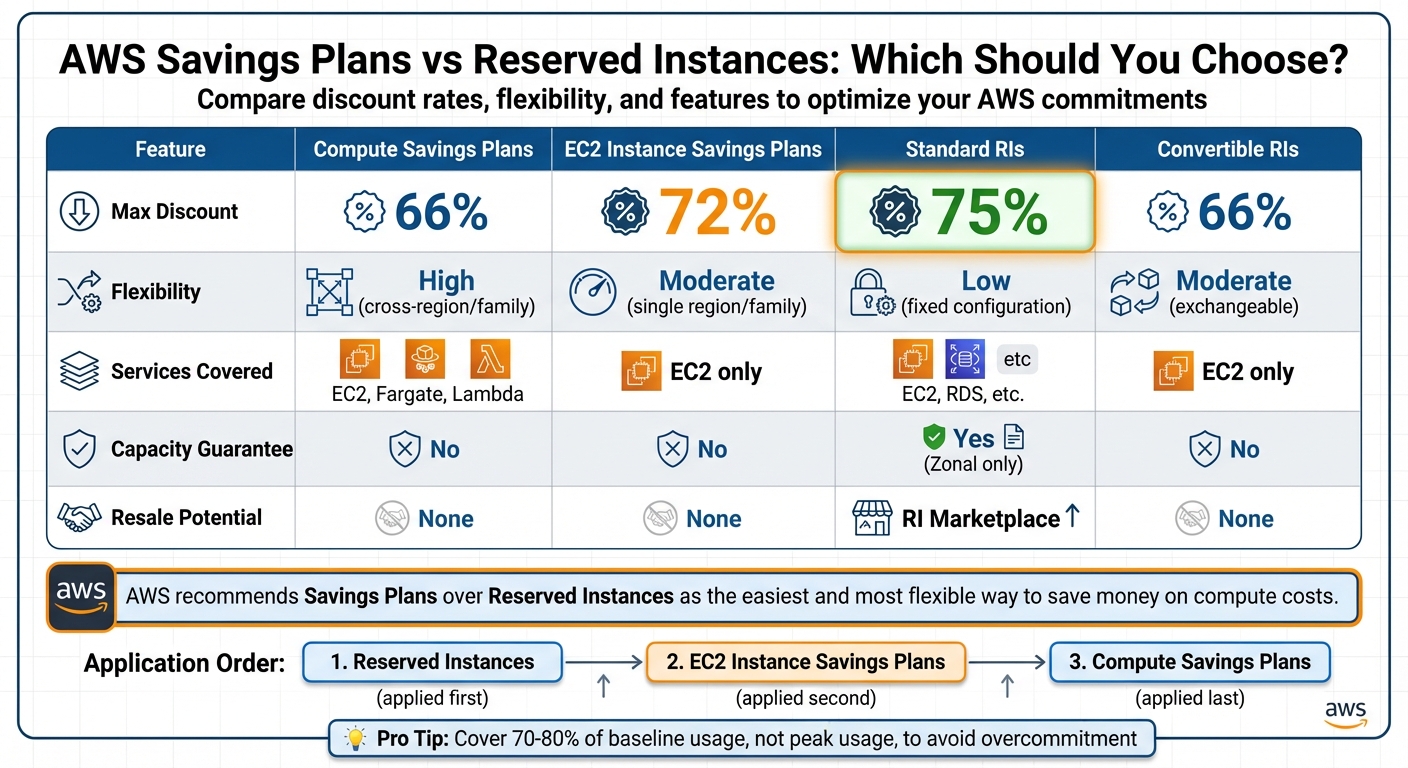
Savings Plans offer flexibility by committing to a fixed hourly spend, while Reserved Instances (RIs) lock you into specific configurations like instance type and region. Among Savings Plans, Compute Savings Plans are the most flexible, automatically applying discounts across instance families, sizes, operating systems, and regions. They cover EC2, AWS Fargate, and AWS Lambda, with discounts of up to 66%. On the other hand, EC2 Instance Savings Plans offer higher discounts - up to 72% - but are restricted to a single instance family and region. For database workloads, Database Savings Plans (introduced in December 2024) provide up to 35% savings across 11 services, including RDS, Aurora, and DynamoDB.
Reserved Instances still play a role in cost management. Standard Reserved Instances provide the highest discount - up to 75% - but are tied to fixed configurations. Convertible Reserved Instances allow you to manually exchange between instance types, though their discounts are capped at 66%. Additionally, only Zonal Reserved Instances guarantee capacity in a specific Availability Zone, a feature not available with Savings Plans.
| Feature | Compute Savings Plans | EC2 Instance Savings Plans | Standard RIs | Convertible RIs |
|---|---|---|---|---|
| Max Discount | 66% | 72% | 75% | 66% |
| Flexibility | High (cross-region/family) | Moderate (single region/family) | Low (fixed configuration) | Moderate (exchangeable) |
| Services | EC2, Fargate, Lambda | EC2 only | EC2, RDS, etc. | EC2 only |
| Capacity Guarantee | No | No | Yes (Zonal only) | No |
| Resale Potential | None | None | RI Marketplace | None |
AWS applies these savings in a specific order: Reserved Instances first, followed by EC2 Instance Savings Plans, and finally Compute Savings Plans. This means the most restrictive discount takes precedence when multiple commitments overlap. While Standard Reserved Instances can be resold on the AWS Reserved Instance Marketplace if your needs change, Savings Plans are non-transferable.
"We recommend Savings Plans over Reserved Instances. Saving Plans are the easiest and most flexible way to save money on your AWS compute costs." – AWS Documentation
To avoid overcommitting, aim to cover 70–80% of your steady-state (baseline) usage rather than peak usage. AWS also introduced a 7-day return policy in March 2024 for Savings Plans with hourly commitments of $100 or less, though this window is quite limited.
Automation is key to managing these commitments effectively, ensuring your strategy keeps pace with changing usage patterns.
Automating Commitment Management with Opsima
As AWS environments grow, managing commitments manually becomes increasingly difficult. Opsima simplifies this process by automating commitment analysis and optimization, ensuring you consistently pay the lowest effective rate.
Opsima can reduce AWS spend by up to 40% by managing both Savings Plans and Reserved Instances across key services like EC2, RDS, Lambda, Fargate, ElastiCache, OpenSearch, and SageMaker. Unlike manual methods that require constant reviews and adjustments, Opsima operates continuously, adapting commitments as your usage evolves. It handles the complexities of determining optimal commitment levels, types, and renewal schedules, freeing up your FinOps and engineering teams to focus on higher-priority tasks instead of spreadsheets. With a quick 15-minute onboarding process and flexible cancellation options, Opsima ensures you're never locked into a strategy that no longer aligns with your business needs.
Creating Governance Policies and Frameworks
Once you've automated your commitment management, the next step is to establish clear policies to curb unnecessary spending. These governance policies act as guardrails, ensuring resources are created, managed, and retired responsibly. Without them, even the most advanced optimization tools can struggle to control costs.
Setting Policies for Resource Provisioning and Budgets
Provisioning policies should cover the entire lifecycle of a resource - creation, modification, and decommissioning. For instance, you can specify which AWS Regions, service types, and resource sizes are allowed in different environments. A common approach is to restrict development accounts to smaller instance sizes, like "medium", while permitting larger configurations for production workloads.
Operational scheduling is another way to cut costs. Policies can be set to shut down non-production resources during off-hours, such as outside 6:00 AM–8:00 PM EST. Additionally, idle resources can be set to terminate automatically after 24–72 hours of inactivity.
"Policies should be simple so that they are easily understood and can be implemented effectively throughout the organization." – AWS Well-Architected Framework
Budget controls are equally important. AWS Budgets allows you to set spending limits at different levels - by account, workload, or tag. The first two action-enabled budgets are free. With Budget Actions, you can automatically restrict permissions or stop resources when spending exceeds your threshold, helping to prevent budget overruns without manual intervention, or estimate your potential savings to see where governance can have the most impact.
For data management, implementing S3 lifecycle policies can transition infrequently accessed data to cheaper storage options. Skipping these foundational policies can leave your organization exposed to a "High" risk of unnecessary spending.
With these policies in place, the next step is to enforce them through access controls and lifecycle management.
Configuring Access Controls and Lifecycle Management
It's essential to define who can create resources and under what conditions. Using Service Control Policies (SCPs) through AWS Organizations, you can enforce organization-wide rules. These might include restricting resource creation in unauthorized Regions or requiring cost-allocation tags like "Cost-Center" or "Owner". SCPs act as unbreakable guardrails, overriding even the highest IAM permissions.
Within individual accounts, apply the principle of least privilege by using IAM roles. To simplify and standardize resource creation, deploy AWS Service Catalog, which provides developers with pre-approved templates configured for both cost-efficiency and compliance. This gives teams the freedom to innovate while staying within budget and policy constraints.
Tools like AWS Config provide continuous monitoring, ensuring resources remain compliant with your policies. Meanwhile, AWS Cost Anomaly Detection uses machine learning to identify unusual spending patterns that might escape standard budget monitoring. For example, you can configure it to alert you when spending spikes beyond a specific threshold, like $1,000.
| Governance Component | AWS Tool/Service | Primary Function |
|---|---|---|
| Access Control | AWS IAM & SCPs | Limits who can create resources and in which Regions |
| Provisioning | AWS Service Catalog | Supplies pre-approved, cost-efficient templates |
| Budgeting | AWS Budgets | Sets spending caps and triggers automated actions |
| Lifecycle | S3 Lifecycle / Instance Scheduler | Automates resource scheduling and data tiering |
| Compliance | AWS Config | Flags resources that deviate from policies |
Start with broad, organization-wide policies and refine them as needed for specific teams or workloads. To ensure everyone is on the same page, include cost-awareness training as part of your new employee onboarding process. This way, governance becomes second nature from day one.
Running Regular Cost Reviews and Audits
Even with solid policies in place, cloud spending can easily stray from business goals if not consistently monitored. Regular audits help uncover inefficiencies, align resources with priorities, and avoid budget overruns.
Scheduling Regular Cost Reviews
Set up a structured schedule for cost reviews to keep spending aligned with your business objectives. According to AWS, implementing a workload review process ensures that spending stays in sync with organizational priorities by analyzing costs at regular intervals. Skipping this step can lead to a High level of risk, as resource usage may quickly diverge from actual business needs.
These reviews shouldn't be limited to the finance team. Include members from application teams, management, and finance to ensure accountability across the organization. Regular reviews build on existing policies, ensuring they adapt to shifting business priorities. Make it a point to include cost impact assessments in IT change management meetings to justify resource modifications from a business perspective.
"Awareness of usage at all levels in the organization is key to driving change, as change in usage drives changes in cost." – AWS
Use tools like AWS Cost Explorer or Amazon QuickSight for daily reviews to track costs at the account, workload, and service levels. Organizations that only respond to alerts, instead of proactively monitoring, face a Medium risk of unexpected expenses. Leverage detailed data - such as hourly and resource-level breakdowns with tagging - to pinpoint the resources responsible for the highest costs.
Additionally, review and update cloud usage policies periodically. This includes adjusting region restrictions and instance size limits to reflect current business needs. Set up AWS Budgets with daily granularity to get alerts for spending thresholds or forecasted overruns. Use email distribution lists for these alerts to maintain continuity when team roles change.
Tracking Trends and Spotting Anomalies
Beyond regular reviews, analyzing trends continuously helps catch discrepancies early. Historical data can reveal patterns that guide smarter spending decisions. AWS Cost Anomaly Detection uses machine learning to monitor costs and automatically flag unusual spending, helping you address issues before they show up in monthly reports.
Pair anomaly detection with tools like AWS Trusted Advisor and AWS Compute Optimizer to identify idle resources, underutilized instances, and opportunities for rightsizing. These audits should focus on eliminating "cloud waste" - resources that are misaligned with actual usage patterns.
Tie spending to specific demand drivers, such as transaction volumes or active user counts, to better understand how resource consumption changes over time. This approach allows you to create unit metrics, like cost per customer or transaction, which can clearly communicate value to stakeholders.
"Accurate cost and usage monitoring helps you understand how optimized a workload is, as well as how profitable organization units and products are." – AWS
Finally, use AWS Budget Actions to automatically enforce spending limits when anomalies arise. For instance, you can restrict IAM permissions or stop specific EC2 or RDS instances if costs exceed your set thresholds. Regular audits and trend analysis are key to maintaining effective cost governance, ensuring your cost-control strategies evolve alongside your AWS environment.
Encouraging Cross-Functional Collaboration
When finance, IT, and business teams operate in isolation, cloud cost optimization often takes a hit. To address this, it's crucial to align these groups so cloud spending is seen as a strategic investment rather than just an operational expense. Without this collaboration, organizations risk inefficiencies and missed opportunities to manage costs effectively.
One effective approach is to establish a Cloud Center of Excellence (CCoE). This group combines financial leaders, technical experts, and business stakeholders to ensure cost awareness is maintained across the organization. Financial leaders can handle invoicing and explore purchasing options like Savings Plans. Meanwhile, technology teams focus on keeping workloads within budget, and business owners provide growth forecasts to guide long-term planning.
Breaking down the technical and financial language barrier is also key. Using unit metrics, such as cost per transaction, can make spending data more accessible and actionable for all teams.
"Make cost data visible to the teams that generate the costs - when engineers can see the bill their services create, they naturally start optimizing." – Nawaz Dhandala, Author, OneUptime
By implementing these strategies, teams can work together more effectively to develop and execute cost optimization plans.
Building Shared Dashboards for Transparency
Shared dashboards are a powerful way to give every team clear visibility into cloud spending. They help align everyone toward common financial goals by making data accessible and actionable. Tools like the AWS Cost Intelligence Dashboard or Amazon QuickSight allow organizations to create dashboards tailored to both executives (with high-level summaries) and engineers (with detailed, resource-level insights). Features like Row Level Security (RLS) ensure teams only see data relevant to their projects, while real-time updates help identify spending anomalies quickly.
For example, in 2023, event management company Cvent saved over $3 million in less than two years by using Cloud Intelligence Dashboards to promote a cost-aware culture. Similarly, Telenor, a telecommunications company, used RLS in their dashboards to simplify data access and provide precise visibility for different teams. Adding automated cost reports and anomaly alerts to team-specific channels can further enhance transparency and keep cost management top of mind.
Setting Up Cloud Governance Forums
Regular governance forums are another effective way to align cross-functional teams on cost strategies. Weekly or monthly meetings provide a platform to review organizational goals, spending trends, and the progress of optimization initiatives. These sessions should include representatives from finance, IT, and business units to ensure all perspectives are considered.
Governance forums are also great for establishing standardized performance metrics, like cost per customer transaction, which directly connect cloud spending to business outcomes. Additionally, these meetings can help define and enforce governance policies, such as tagging standards or Service Control Policies, to prevent unexpected costs.
Organizations can choose between showback (reporting costs to teams) and chargeback (recovering costs through accounting) models based on their preferences. While showback raises awareness with minimal complexity, chargeback encourages accountability, even though it may feel like a financial penalty to some teams. Integrating cost discussions into IT change management processes ensures that infrastructure decisions align with business goals.
Finally, onboarding training for new team members on cloud cost awareness and organizational policies can help eliminate outdated practices. This training supports a shift toward a dynamic, cloud-native mindset where technology spending is treated as a strategic investment rather than a static expense.
Conclusion and Key Takeaways
Effective governance ensures that every dollar spent delivers value. As Nawaz Dhandala, author at OneUptime, aptly states:
"The goal isn't to minimize spending. It's to maximize the value you get from every dollar spent on AWS".
With projections estimating $44.5 billion in wasted cloud resources by 2025, organizations that adopt structured governance frameworks can position themselves for a clear competitive edge.
Here’s a quick recap of the core principles: Successful governance is built on four foundational pillars - visibility and transparency, accountability and ownership, automation and tools, and cross-functional collaboration. Accurate tagging is a cornerstone for cost attribution. Once visibility is achieved, assigning ownership through chargeback or showback models ensures teams are accountable for their resource consumption.
Automation is another game-changer. Tools like AWS Compute Optimizer provide rightsizing recommendations, while platforms such as Opsima align cloud commitments with real-time usage, reducing cloud costs by up to 40% without requiring infrastructure changes. These automated solutions ensure organizations consistently pay the lowest possible rate for their resources, all while maintaining flexibility as needs evolve.
Governance thrives when it becomes part of the organizational culture instead of being treated as a one-time initiative. When engineers have clear insight into the costs generated by their services, they naturally gravitate toward optimization. Practices like weekly cost reviews, shared dashboards, and regular governance forums keep cost management at the forefront for finance, IT, and business teams alike. These cultural habits, combined with automated cost management strategies, transform cloud spending into a strategic investment. This shift is what sets apart organizations that excel in the cloud from those that struggle with escalating costs.
FAQs
What should we do first to improve AWS cost visibility?
To improve your understanding of AWS costs, begin by activating detailed data sources, such as hourly granularity, within your cost management tools. Additionally, configure AWS Cost and Usage Reports to monitor and analyze both costs and usage with precision. These steps provide the insights you need to manage expenses effectively.
How do we enforce required AWS tags without slowing teams down?
To ensure teams can enforce required AWS tags without any slowdowns, leverage automated tools like AWS Config and AWS Organizations. These solutions let you set up centralized tagging policies, ensuring tags are consistently applied across all resources.
Taking proactive steps is key. For example, tag policies or service control policies (SCPs) can prevent the creation of resources that don’t meet tagging requirements. Additionally, tools like Tag Editor make it easy to update tags in bulk, helping maintain compliance without interrupting workflows.
How much baseline usage should we commit to with Savings Plans or Reserved Instances?
When choosing Savings Plans or Reserved Instances, aim for a commitment level that aligns closely with your past usage patterns or expected future needs. These options work best when your commitment matches your actual consumption. However, avoid overcommitting - keeping some flexibility allows you to adjust as your requirements evolve.